
Security, Privacy & Trust // The Property and Flexible-Space Sales Operating System
Give each audience the view it needs without giving up control of the property behind it.
SiteSee connects public property experiences, buyer-specific planning views, internal workspaces and portfolio governance. Trust depends on knowing which layer is public, which is protected, who can change it, how activity is handled and what system remains authoritative.
Customer-controlled publishingPurpose-based accessPrivacy-aware measurementTransparent boundaries
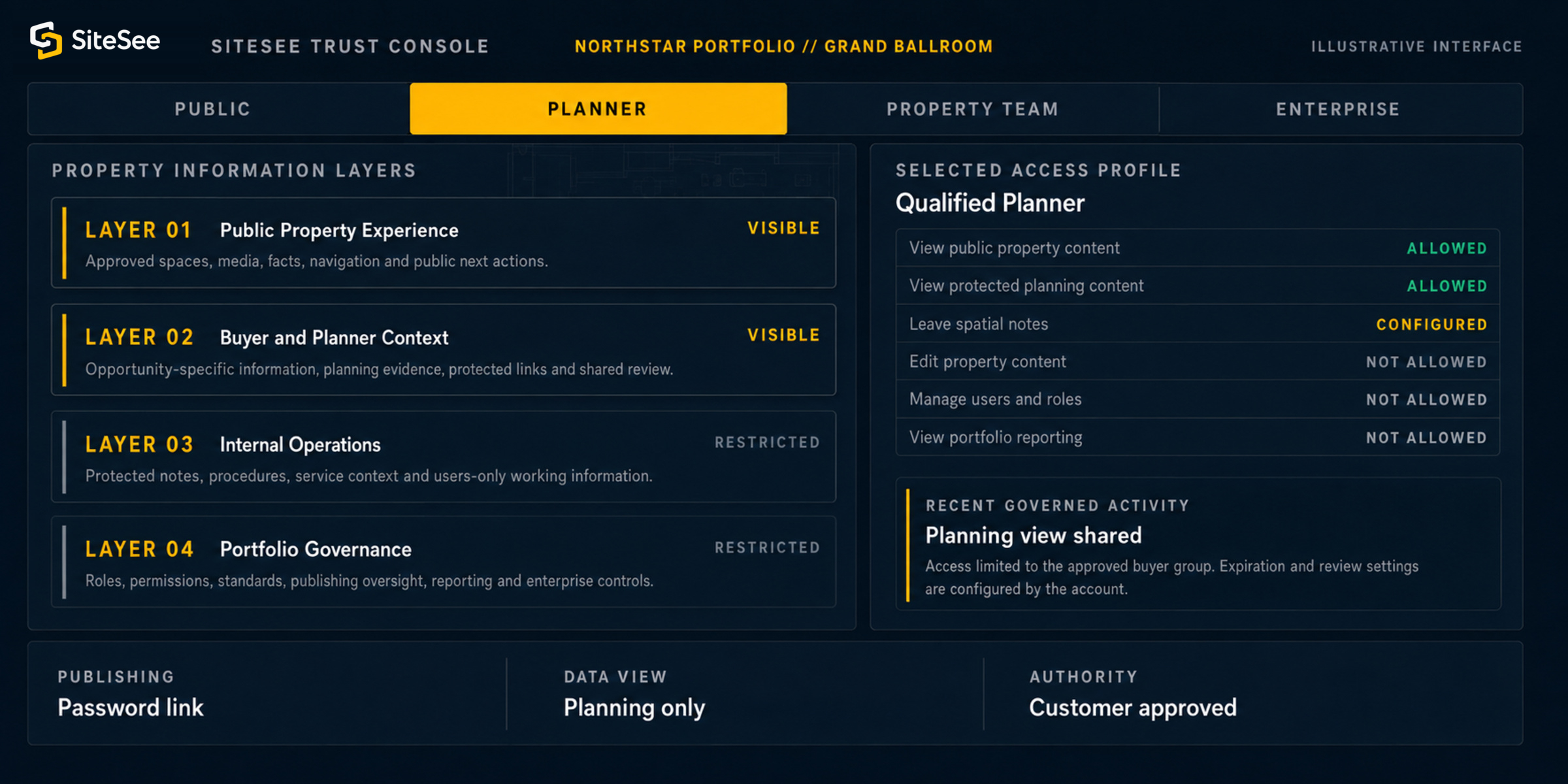
SiteSee Trust ConsoleNorthstar Portfolio // Grand BallroomIllustrative interface
Property information layersQualified planner view
A Shared-Responsibility Trust Model
Trust grows when ownership, access and responsibility are clear from the start.
SiteSee can connect property content, users, engagement information, planning records and external systems. That does not make one company the authority for every layer.
The deployment should identify the customer’s decisions, the controls SiteSee operates, and the rules or dependencies that remain with connected providers.
The property controls what is true, approved and appropriate to publish.
- Property facts, media, plans and content rights
- Public, buyer, planner, staff and portfolio audiences
- User invitations, role assignments and access approvals
- Required notices, consent, retention and internal policy
- Authoritative CRM, PMS, booking, operational and legal records
 Shared responsibilityNot shared ambiguity
SiteSee is responsible for the controls it operates and the claims it makes.
- Platform and account-control design within the deployed service
- Configuration support and clear availability boundaries
- Security and privacy documentation available for the account
- Operational monitoring, escalation and incident coordination within scope
- Transparent identification of dependencies and external providers
Verified connectionPurpose, data and authorityExternal systems remain responsible for their own policies, availability and data.
- Identity, email, CRM, RFP, booking and brand environments
- Third-party embeds, APIs and external content
- Credentials, tokens, permissions and revocation rules
- AI or media providers used for an approved workflow
- Jurisdiction, contractual terms and provider-specific retention
Purpose-Based Access
Access should follow the work a person is authorized to do, not the convenience of one universal link.
Public access, password-protected planning views, shared workspaces, users-only operational views, standard roles and custom permissions can separate audiences while preserving one connected property foundation.
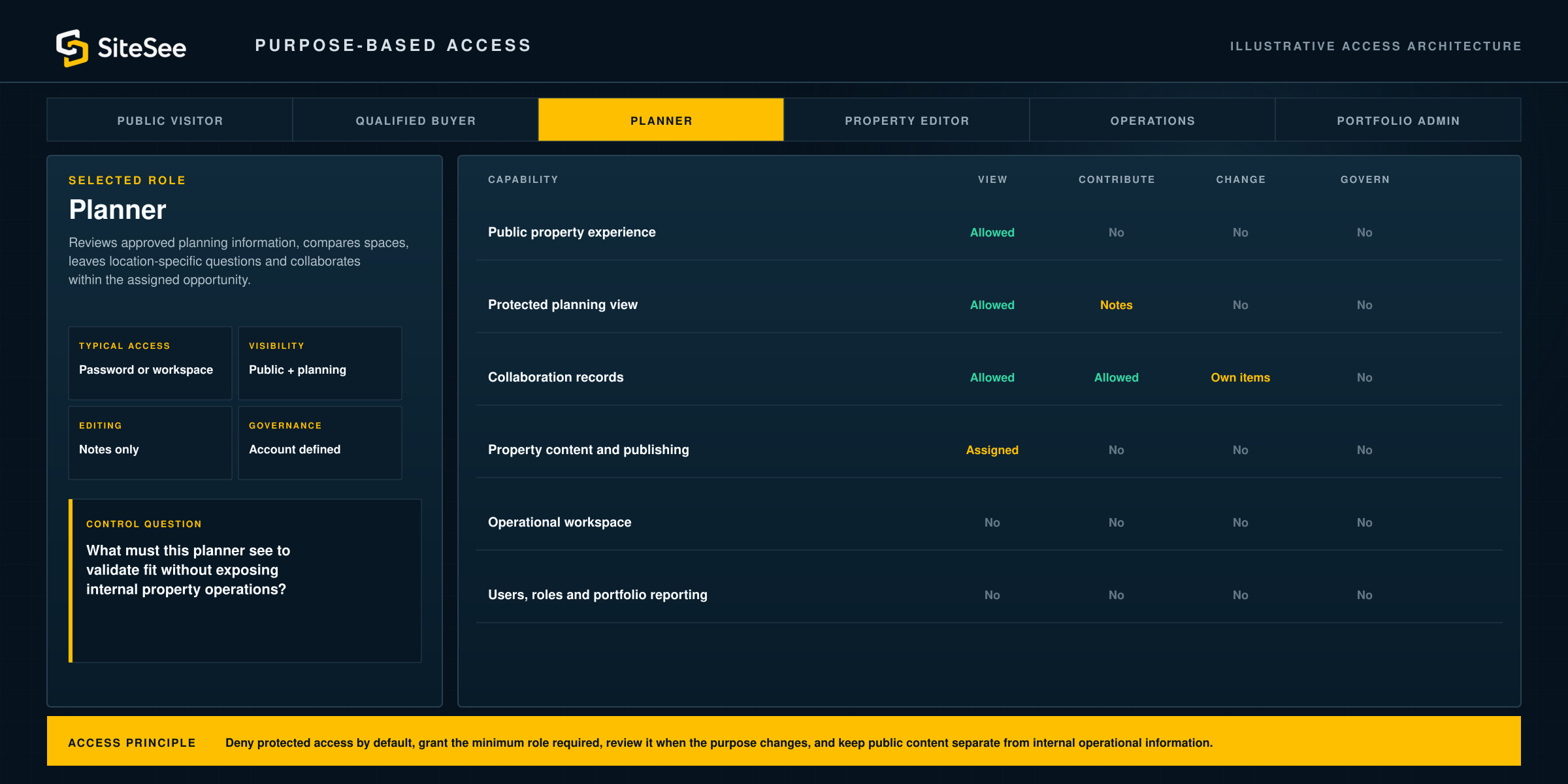
Illustrative access architectureQualified plannerRole lens
Access principleDeny protected access by default, grant the minimum role required, review it when the purpose changes, and keep public content separate from internal operational information.
Privacy Across the Data Lifecycle
Collect only what serves an approved purpose, then manage it through use, sharing, retention and disposal.
Privacy is not limited to preventing unauthorized access. It also requires understanding how data processing may affect people, which information is necessary, how long it remains useful and how the organization communicates its practices.
Lifecycle control path01DefineState the business purpose and the people affected. 02CollectUse the minimum data required for that approved purpose. 03UseRestrict visibility and processing to the intended workflow. 04ShareIdentify every external destination and the authority for the transfer. 05Retain or disposeKeep information only as long as the account, contract and applicable requirements justify it.
Decide what outcome is being supported before collecting or connecting data.
Avoid collecting broad information simply because a tool can capture it.
Make roles, permissions and reporting audiences consistent with the stated purpose.
Distinguish a public link, an embed, a workflow connection and an actual data exchange.
Define review, export, deletion, return and archival responsibilities before they are needed.
Consent, notice, lawful basis, retention and individual-rights requirements depend on the audience, jurisdiction, account configuration and actual data processing. They must be confirmed for the deployment.
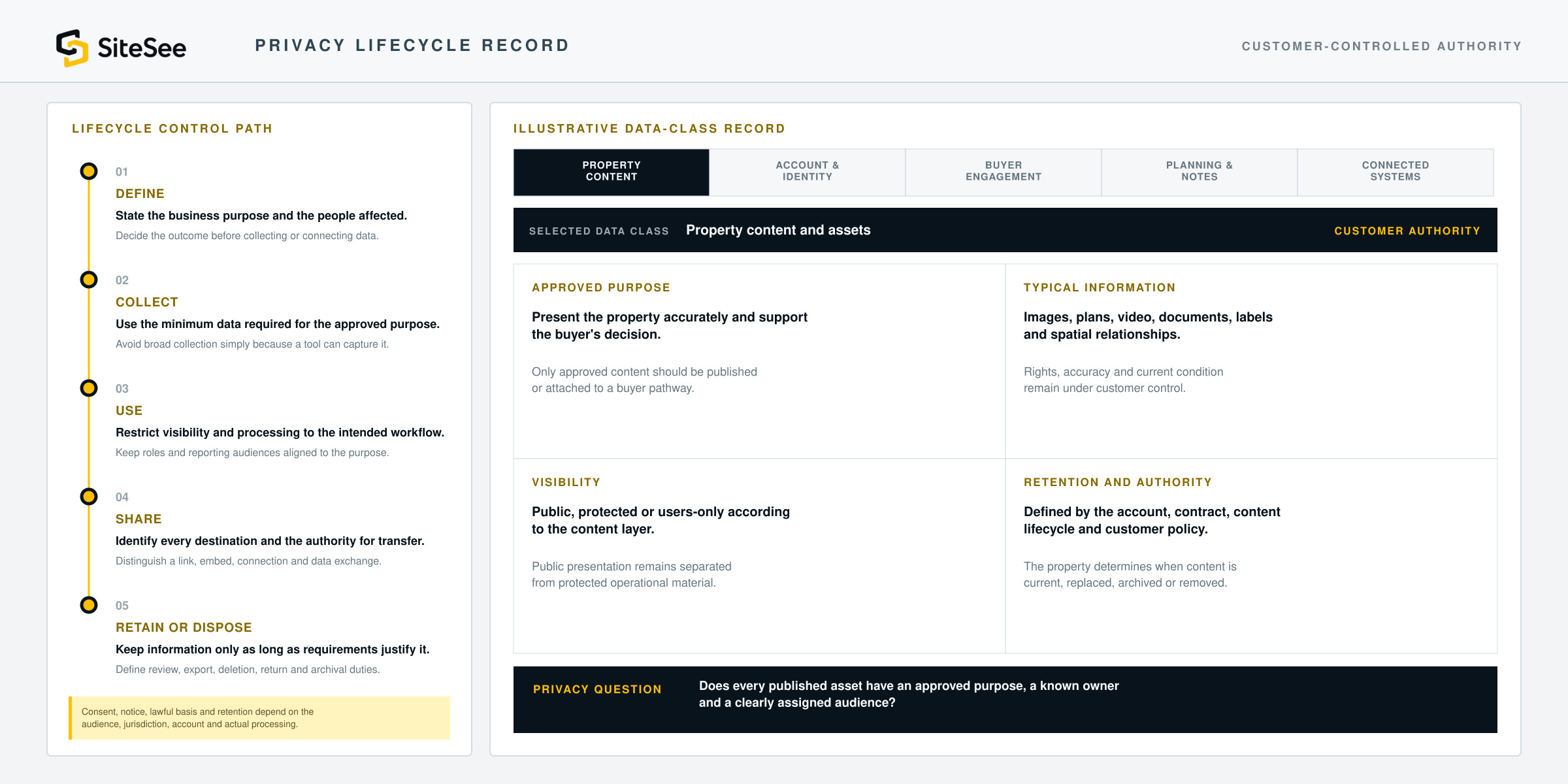
Selected data classProperty content and assets
Customer authorityOnly approved content should be published or attached to a buyer pathway.
Rights, accuracy and current condition remain under customer control.
Public presentation should remain separated from protected operational material.
The property determines when content is current, replaced, archived or removed.
Privacy questionDoes every published asset have an approved purpose, a known owner and a clearly assigned audience?
Security as an Operating Discipline
Protecting the platform is a continuous cycle, not a one-time launch task.
SiteSee organizes security conversations around recognized risk-management questions: who governs the risk, what must be identified, which safeguards are appropriate, how events are detected, who responds and how operations recover.
Framework-informed structure. Not a claim of certification or complete implementation of every referenced control.
Set ownership, policy and risk priorities.
Define decision rights, supplier responsibilities, account expectations, security contacts and the evidence required for the deployment.
Who owns the risk and approves the control?Know the systems, data, users and dependencies.
Map property content, account information, connected systems, external providers, access paths and the consequences of failure or misuse.
What must be protected and why?Apply safeguards appropriate to the risk.
Confirm identity, authentication, access control, secure configuration, data protection, development practices, resilience and backup requirements for the deployed architecture.
Which controls reduce likelihood and impact?Find events that require investigation.
Define relevant logging, activity review, anomaly detection, alerting and escalation without collecting more personal data than the approved purpose requires.
What should be observed and by whom?Act, contain and communicate.
Identify who triages an event, who contains it, which customers or providers must be contacted and what contractual or legal notification rules apply.
Who does what when an event occurs?Restore service and improve the system.
Plan for restoration, continuity, data recovery, stakeholder communication and the incorporation of lessons into future security and privacy decisions.
How is normal operation restored and improved?Security-program rulePublic claims should describe verified controls, documented responsibilities and actual evidence. They should never imply that a framework name or vendor logo eliminates risk.
Trust Controls by Deployment
The correct control model depends on who is using the property experience and what they are permitted to do.
SiteSee can support different access patterns from the same spatial foundation. Each pattern requires a deliberate audience, purpose, permission model and source of authority.
Help broad audiences understand approved property information.
Designed for marketing, discovery and initial evaluation without exposing buyer-specific, staff or operational layers.
- Public or approved embedded access
- Property-controlled media and facts
- Public calls to action
- Privacy-aware analytics configuration
- No protected operations by default
Share decision-specific evidence with a controlled group.
Designed for qualified opportunities, planning review, collaboration and stakeholder alignment.
- Password or workspace access
- Opportunity-specific content
- Spatial notes and approved attachments
- Access review and expiration where configured
- Retention aligned to the workflow
Keep protected guidance separate from public property presentation.
Designed for authorized staff, procedures, service context, location-specific knowledge and operational coordination.
- Users-only access
- Role-based visibility
- Protected notes and procedures
- Authoritative-source references
- Customer-controlled update ownership
Apply common governance without erasing local property control.
Designed for brands, management companies, ownership groups and complex multi-property operating models.
- Standard roles and custom permissions
- Approval and publishing governance
- Portfolio reporting access
- White-label or custom-domain scope
- Validated identity and system connections
AI and Representation Trust
AI should extend approved knowledge, not introduce hidden uncertainty.
SiteSee may support AI-assisted design, 2D and 360-degree staging, guided experiences and buyer-facing assistance. Every use should identify the approved source, the data sent, the provider involved, the review requirement and whether the output represents a current or proposed condition.
Source before generation
Use approved property material, plans, content or a validated knowledge source.
Disclosure before enablement
Confirm model provider, processing purpose, retention, model-improvement use and account controls.
Human review before publication
Generated images, configurations, answers and pathways require responsible approval.
Proposed is never presented as present
AI staging and CGI must remain clearly distinguished from the property’s current condition and professional approval.
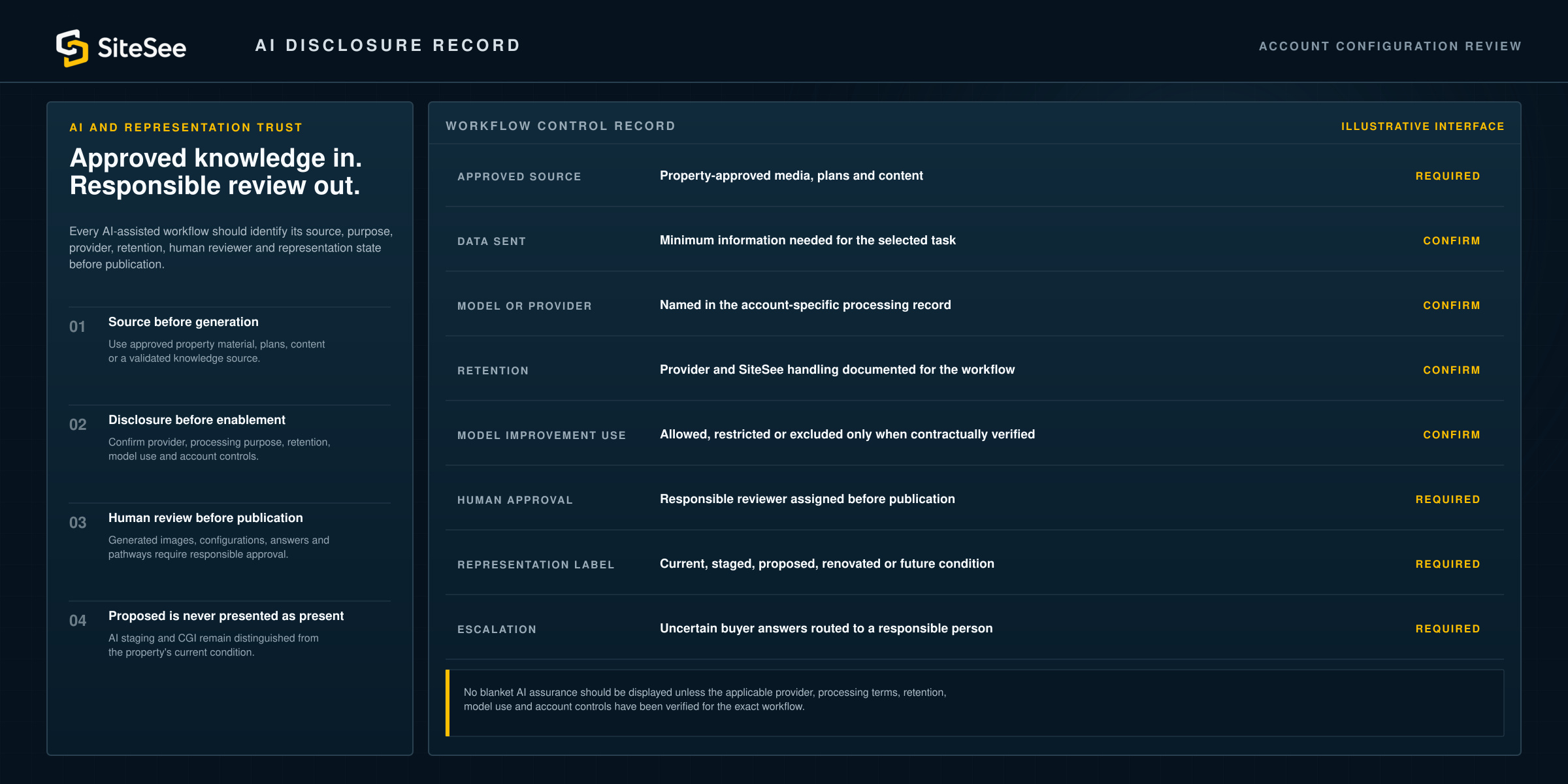
AI disclosure recordAccount configuration reviewIllustrative interface
Approved sourceProperty-approved media, plans and contentRequired
Data sentMinimum information needed for the selected taskConfirm
Model or providerNamed in the account-specific processing recordConfirm
RetentionProvider and SiteSee handling documented for the workflowConfirm
Model improvement useAllowed, restricted or excluded only when contractually verifiedConfirm
Human approvalResponsible reviewer assigned before publicationRequired
Representation labelCurrent, staged, proposed, renovated or future conditionRequired
EscalationUncertain buyer answers routed to a responsible personRequired
No blanket AI assurance should be displayed unless the applicable provider, processing terms, retention, model use and account controls have been verified for the exact workflow.
Trust Across Integrations and Distribution
Know whether the destination uses a link, an embed, a workflow connection or an actual exchange of data.
The security and privacy responsibilities change when SiteSee moves from public distribution into authenticated systems, APIs, CRM records, external AI services or brand-controlled environments.
Start with the approved purpose.
Define the customer outcome before deciding whether any system connection is needed.
Use the least complex connection that solves the problem.
A secure link may be more appropriate than a persistent data exchange.
Identify the authoritative source.
SiteSee can present or connect information, but it should not silently replace the system responsible for the record.
Plan credentials, access, revocation and monitoring.
Every custom connection needs an owner and a way to disable or revise it.
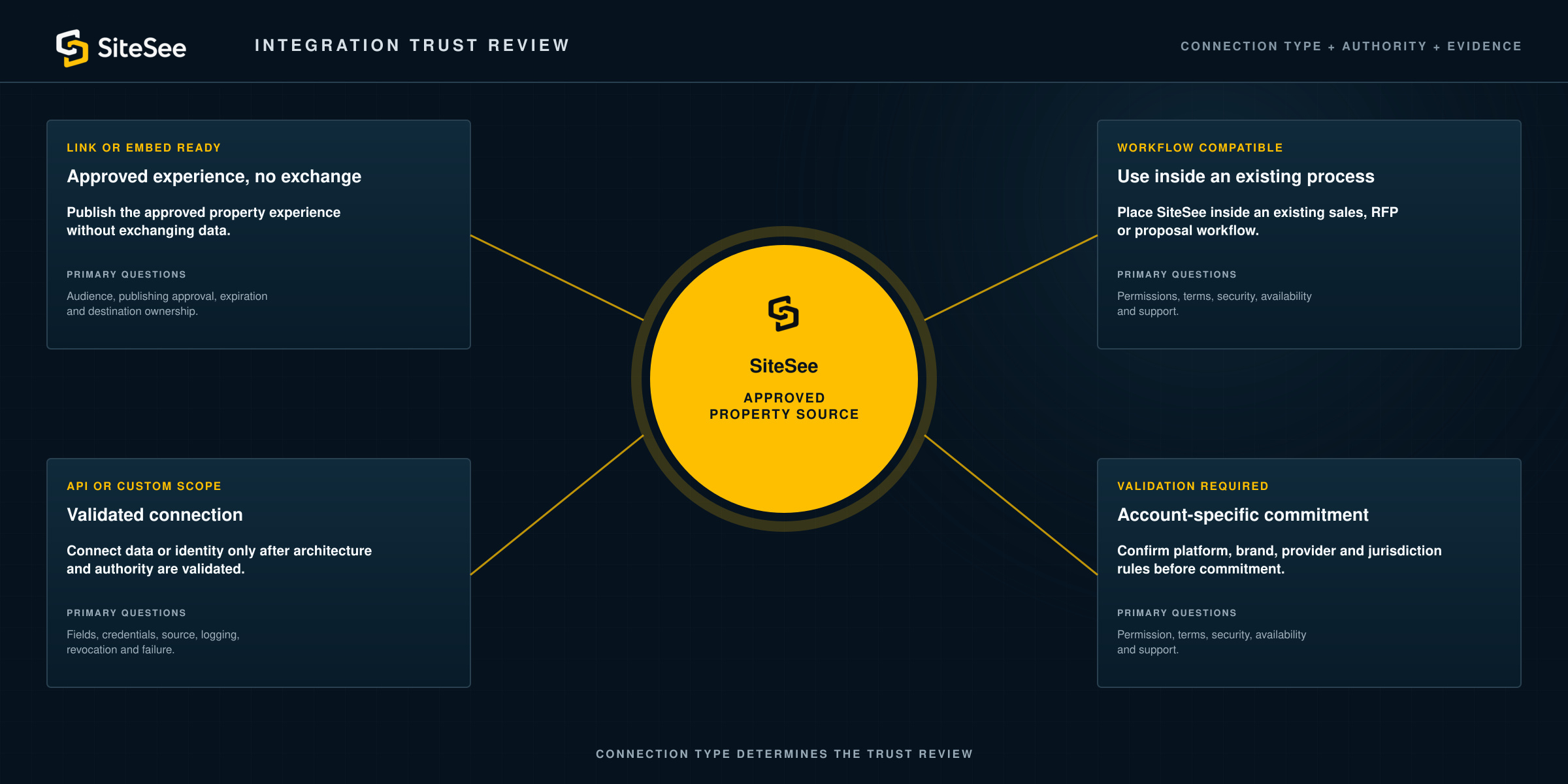
Link or Embed ReadyPublish the approved experience without exchanging authoritative data.Primary questions: placement, audience, privacy notice and channel policy.
Workflow CompatibleUse SiteSee inside an existing sales, RFP or proposal process.Primary questions: access, sharing, retention and responsibility.
API or Custom ScopeConnect data or identity only after architecture and authority are validated.Primary questions: fields, credentials, source, logging, revocation and failure.
Validation RequiredConfirm platform, brand, provider and jurisdiction rules before commitment.Primary questions: permission, terms, security, availability and support.
SiteSeeApproved property sourceProcurement and Assurance
Evaluate trust through clear controls, defined scope and evidence your team can review.
A responsible security review distinguishes what is documented now, what is account-specific, what remains planned and what has not been claimed. SiteSee provides the clearest available answer rather than relying on badges that are unverified or irrelevant to the deployed service.
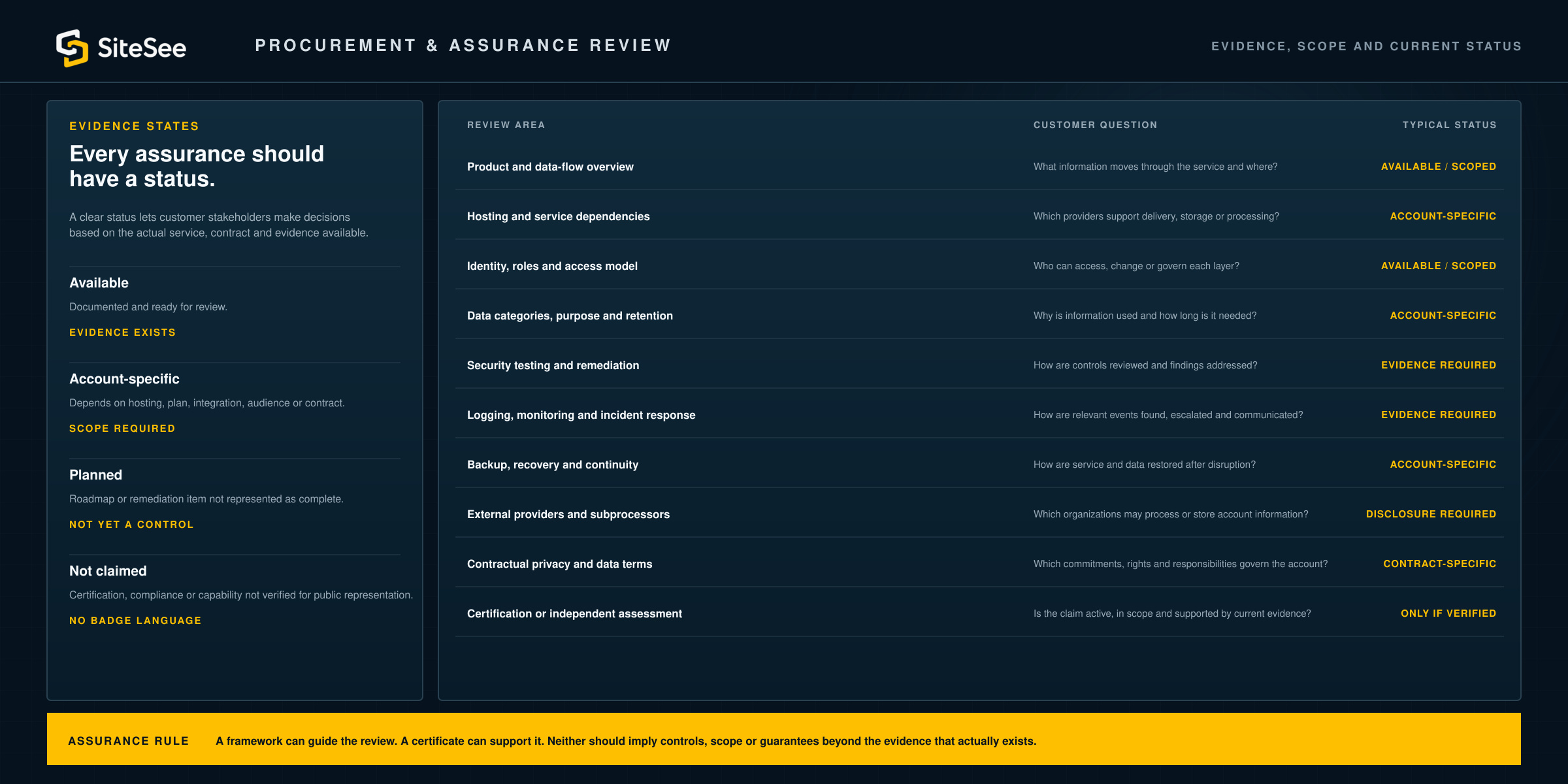
Evidence statesAvailableDocumented and ready for review.Evidence exists Account-specificDepends on selected hosting, plan, integration, audience or contract.Scope required PlannedRoadmap or remediation item that is not represented as complete.Not yet a control Not claimedCertification, compliance or capability not verified for public representation.No badge language
Every assurance should have a status.
Security and privacy maturity changes over time. A clear status lets customer stakeholders make decisions based on the actual service, contract and evidence available.
Review areaCustomer questionTypical status
Product and data-flow overviewWhat information moves through the service and where?Available / scoped
Hosting and service dependenciesWhich providers support delivery, storage or processing?Account-specific
Identity, roles and access modelWho can access, change or govern each layer?Available / scoped
Data categories, purpose and retentionWhy is information used and how long is it needed?Account-specific
Security testing and remediationHow are application controls reviewed and findings addressed?Evidence required
Logging, monitoring and incident responseHow are relevant events found, escalated and communicated?Evidence required
Backup, recovery and continuityHow are service and data restored after disruption?Account-specific
External providers and subprocessorsWhich organizations may process or store account information?Disclosure required
Contractual privacy and data termsWhich commitments, rights and responsibilities govern the account?Contract-specific
Certification or independent assessmentIs the claim active, in scope and supported by current evidence?Only if verified
Assurance ruleA framework reference can guide the review. A certificate can support the review. Neither should be used to imply controls, scope or guarantees beyond the evidence that actually exists.
Security, Privacy and Trust Boundaries
Use clear controls and honest evidence without promising that risk can be eliminated.
Security and privacy depend on technology, configuration, people, process, connected providers and changing threats. SiteSee therefore states what the platform supports, what remains under your control and which commitments require account-specific documentation.
No absolute security claim
No software platform can guarantee that an incident, misuse or service disruption will never occur.
Controls should reduce risk, support detection and response, and improve resilience according to the deployed environment.
No generic legal-compliance claim
Privacy and regulatory obligations depend on the customer, data, people, jurisdiction and actual processing.
Applicable notices, lawful basis, consent, rights, retention and contractual terms must be evaluated for the account.
No unverified certification badge
SOC, ISO, PCI, HIPAA, GDPR, CCPA or similar language must not appear as a blanket assurance unless scope and evidence are verified.
Where an independent assessment or contractual commitment exists, the public statement must match the exact service and period covered.
Customer authority remains
SiteSee does not replace customer identity systems, legal review, CRM, PMS, operational systems or professional responsibility.
The customer remains responsible for approved users, content, notices, authoritative records and time-sensitive operational information.
Begin With the Audience, Data and Required Assurance
Begin with the audience, the information it needs and the level of assurance your organization requires.
Identify who needs access, what they need to accomplish, which information is appropriate, what system remains authoritative and which evidence your stakeholders require. SiteSee can then scope the access model, privacy choices, integrations and trust documentation around the real deployment.