
Collaboration & Live Meetings // The Property and Flexible-Space Sales Operating System
Keep the property context intact as the decision changes hands.
SiteSee gives buyers, planners, sales teams and operations one approved place to review the property together. Meet inside the experience, ask questions at exact locations, attach supporting evidence, assign responsibility and preserve the path from question to decision.
The Handoff Problem
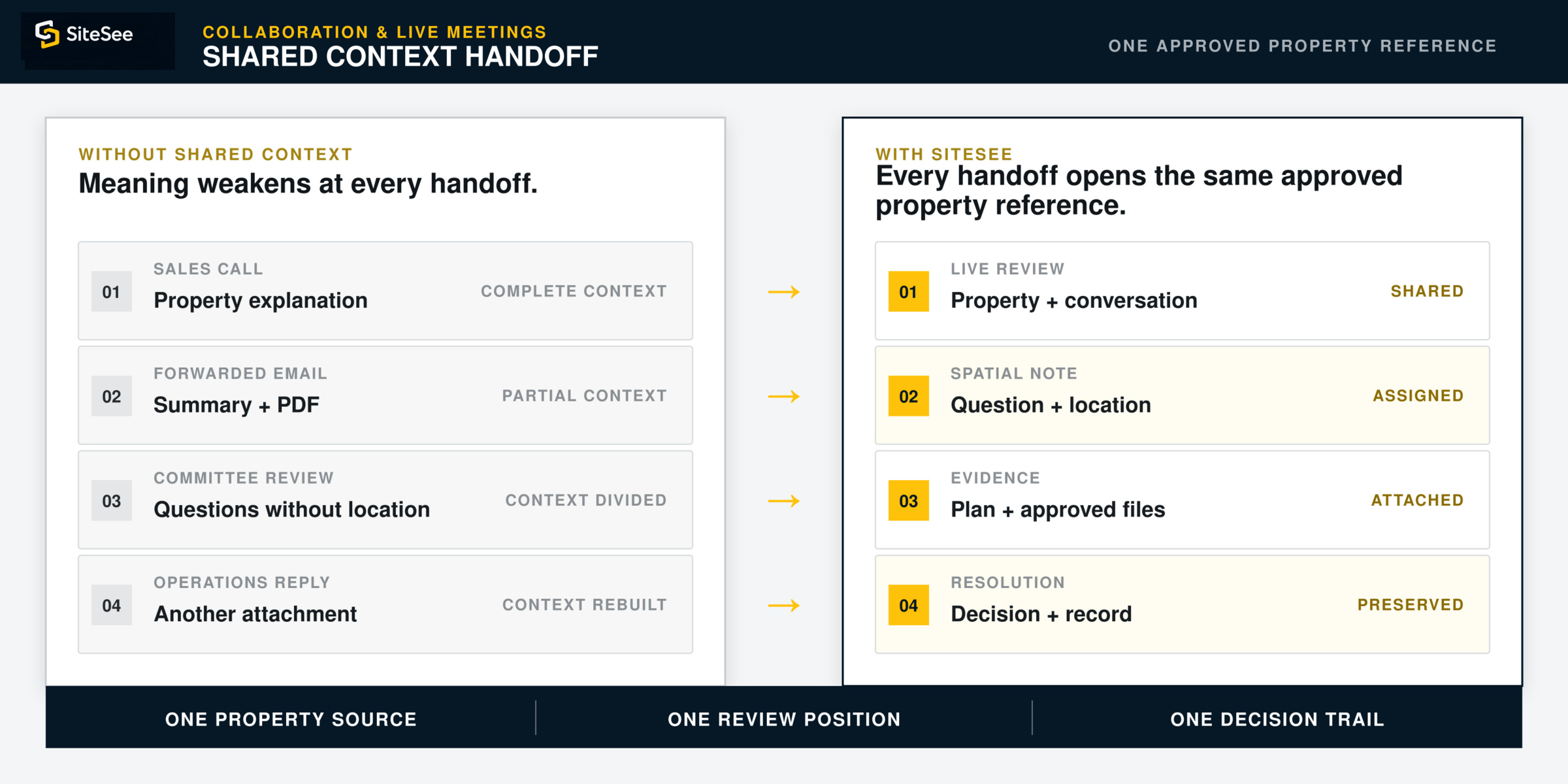
The first buyer may understand the property clearly. By the time the decision reaches everyone else, the context is often reduced to a summary.
One person reviews the property with sales. Another receives a forwarded PDF. A planner asks a question in email. Operations replies with a different attachment. By the time the opportunity reaches a committee, the physical context that made the explanation meaningful may be gone.
SiteSee keeps the property, discussion, evidence and approved next action connected as the opportunity moves from person to person.
Three Collaboration Modes
Give every stakeholder the same approved reference—whether they join live or review later.
Collaboration is not one feature. It is the connected use of live review, location-specific discussion and controlled access around the same approved property experience.
Live Guided Meeting
Meet inside the property instead of screen-sharing disconnected files.
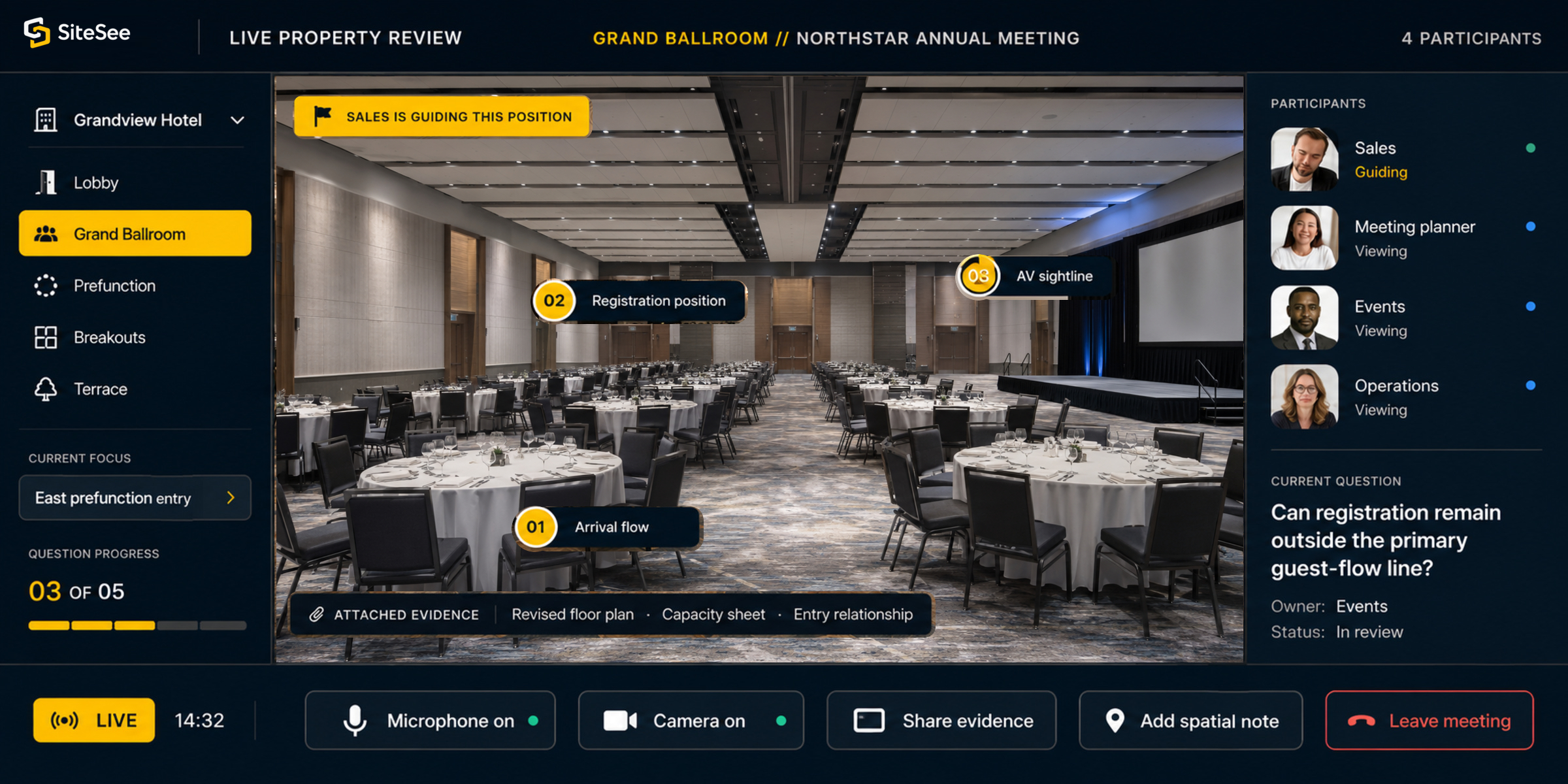
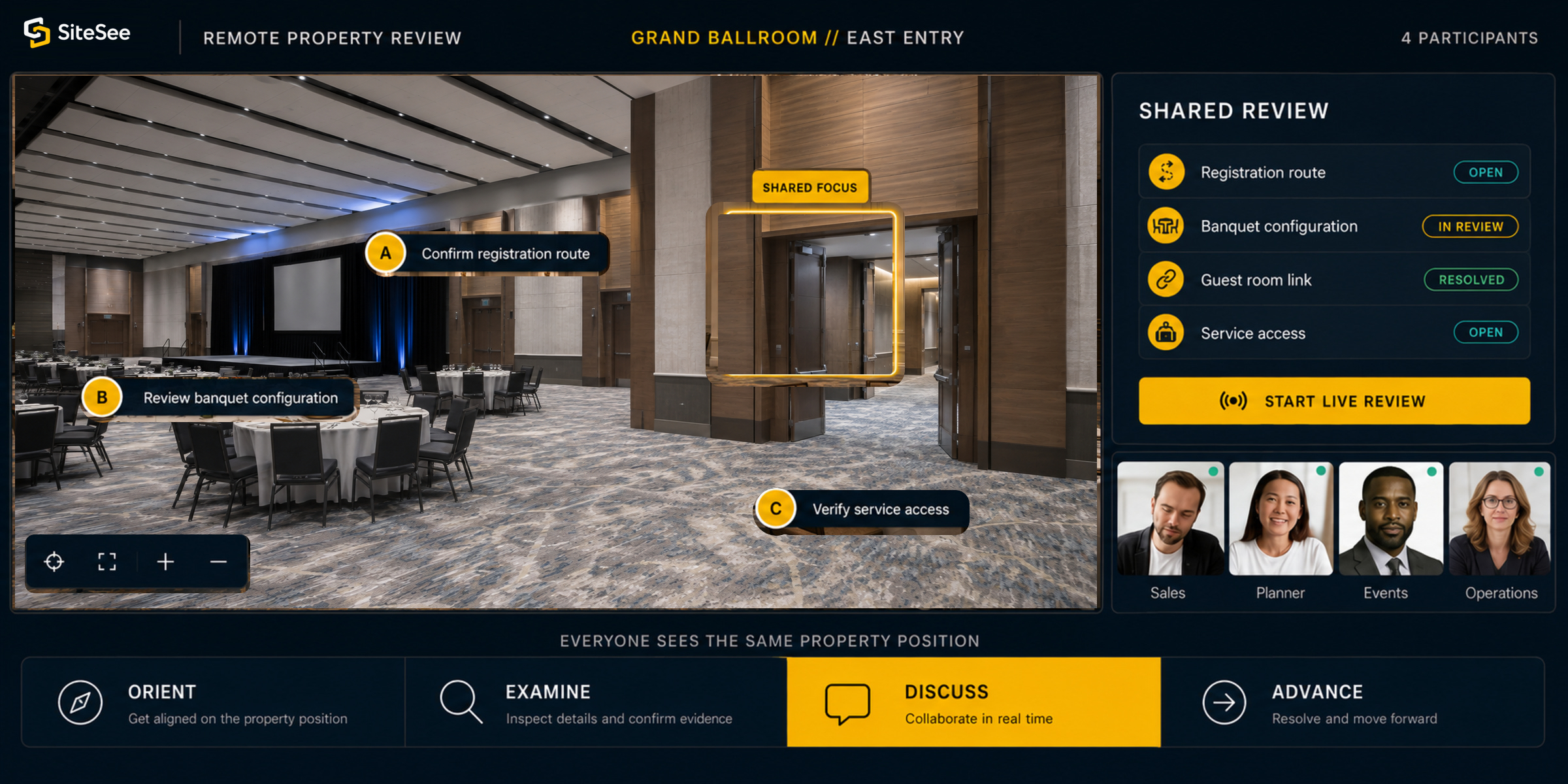
Guide buyers through the approved experience, focus everyone on the same room or property relationship, open supporting evidence and turn the conversation into a more concrete review.
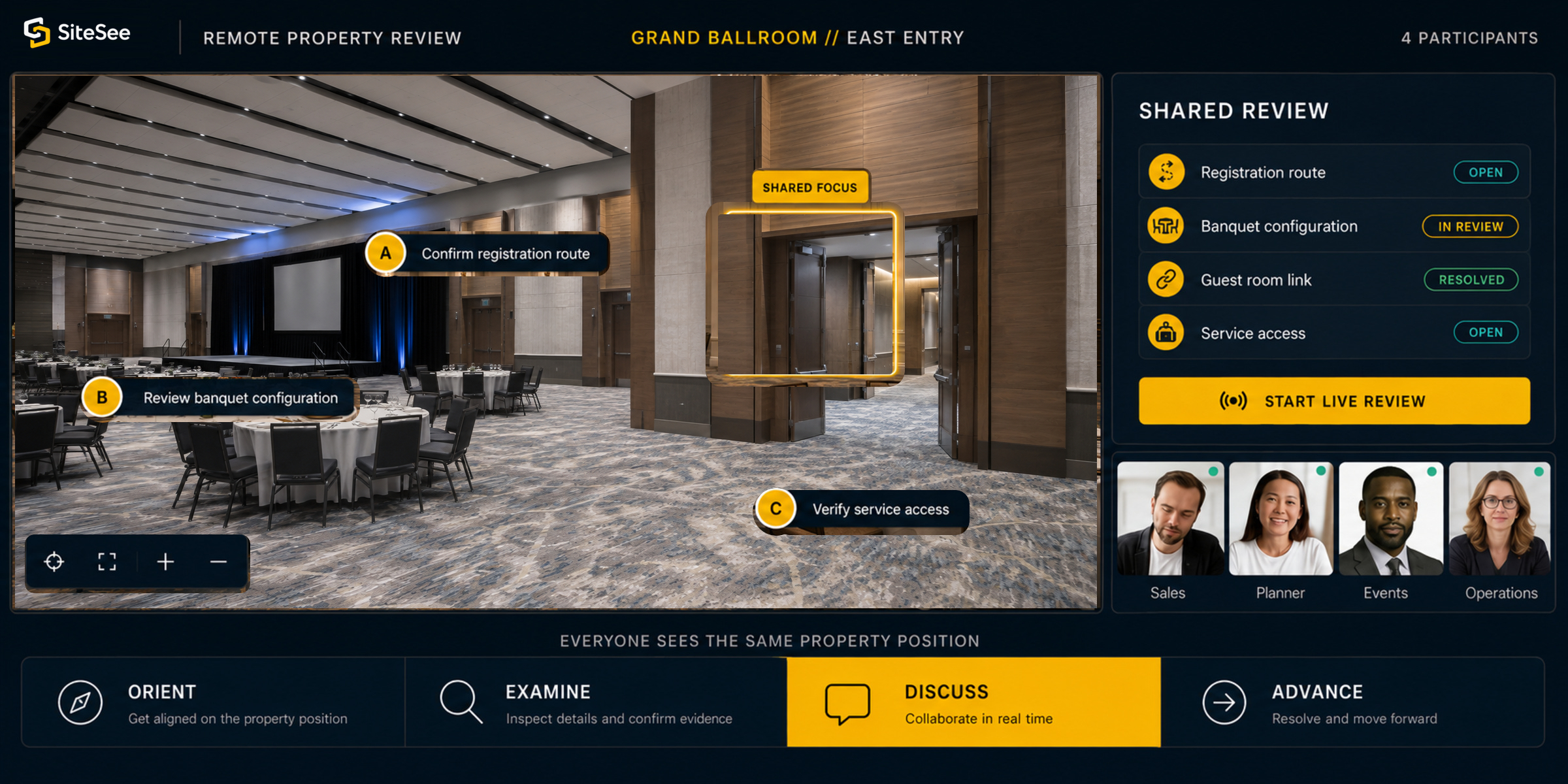 Shared focus
Live Review Inside the Experience
Make the meeting about the buyer’s decision—not about finding the next file.
A live property conversation should be able to move naturally from orientation to evidence, from evidence to a question, and from the question to the next action. The property remains visible while the conversation becomes more specific.
Begin in the experience prepared for this buyer.
Use the relevant property pathway or review-specific version rather than starting from a generic presentation.
Show where the space sits and what surrounds it.
Establish the property relationships before discussing a single capacity, configuration or detail.
Open the approved evidence in the place it explains.
Review plans, media, dimensions, links or documents without leaving the property context.
Place the question at the exact location it concerns.
Keep the conversation attached to the room, route, fixture or planning point under review.
Identify the stakeholder and next action.
Use mentions, status and controlled workspaces so ownership does not disappear after the meeting.
Share the same property position with everyone who follows.
Continue the review asynchronously without asking the first buyer to recreate the entire conversation.
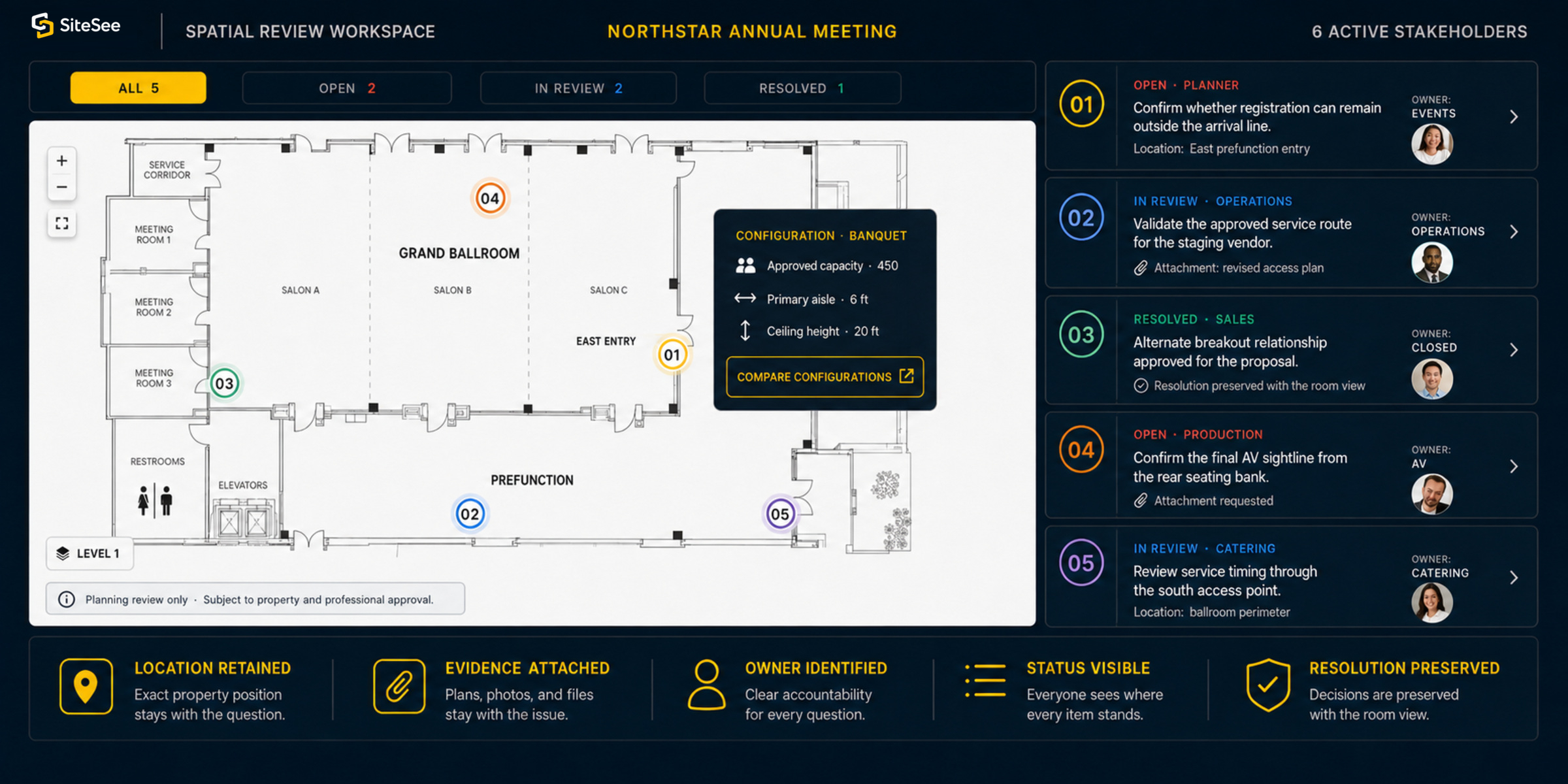
Location: East prefunction entry
Attachment: revised access plan
Resolution preserved with the room view
Attachment requested
Location: ballroom perimeter
Spatial Notes & Decision Trail
Keep the question where it can still be understood later.
A general email can identify a problem but still leave the recipient asking where it applies. A SiteSee spatial note keeps the comment, stakeholder, supporting evidence and status connected to the exact property position.
One Property Source. Controlled Views.
Give each audience the right working context without publishing every layer to everyone.
Buyers, planners, operations and leadership may need different information and permissions. SiteSee can preserve one property foundation while separating what each participant can see, review or act upon.
Let one buyer bring the decision group into the same approved property reference.
Core capabilityAdd a simple protection layer for event, client or planning-specific material.
Core capabilitySeparate deeper working content from the general public presentation.
Plan featureLimit protected operations and actions to authorized participants.
Plan featureReview-Specific Experiences
One approved source can support different opportunities without becoming a pile of disconnected copies.
A corporate meeting, wedding committee, owner review and production partner may need different evidence, emphasis and access. SiteSee can create a controlled experience version for a defined opportunity or working group while preserving the underlying property source.
- Begin with the approved property foundation.
- Include the spaces and evidence relevant to the opportunity.
- Apply the appropriate access and review controls.
- Keep the version recognizable to the property and audience.
- Retire or update the version when the opportunity changes.
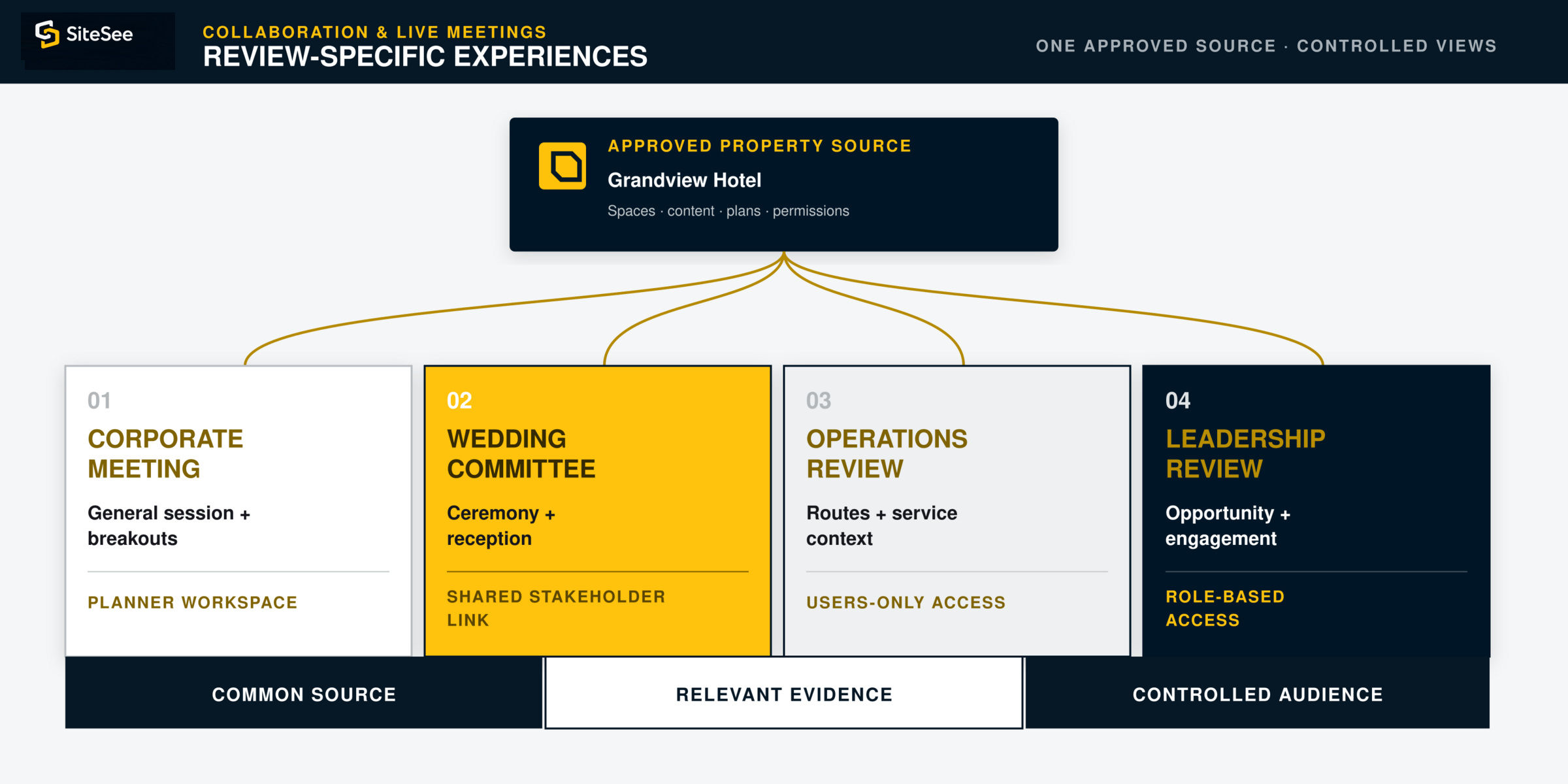
 Approved property sourceGrandview HotelSpaces · content · plans · permissions
Collaboration Boundaries
Use the platform to improve shared understanding—not to blur approval, privacy or authority.
Collaboration features are configured around the audience, purpose and account. The property remains responsible for authoritative approvals, protected information, participant access and the policies governing records or communications.
Match the view and actions to the approved participant.
Password, user and role controls should reflect the information being shared.
Define how participant identity, notes and attached evidence may be used.
Privacy, consent and retention rules must be appropriate to the account and purpose.
Keep official approvals in the systems and documents that govern them.
A resolved SiteSee note supports coordination; it does not replace contracts, approved plans or professional authorization.
Confirm the live and asynchronous functions enabled for the workspace.
Several collaboration capabilities depend on the active plan, configuration and implementation scope.
Availability & Implementation
Begin with simple, controlled sharing. Add deeper collaboration only when the decision process needs it.
Not every property needs every collaboration layer on day one. SiteSee can begin with shared access and expand into live meetings, spatial review and protected workspaces as the customer workflow becomes more specific.
Keep the property review shareable and controlled.
- Shared stakeholder link
- Password-protected planning view
- Approved property context
- Buyer and committee access
Add location-specific discussion and shared working space.
- Spatial notes and mentions
- Approved attachments
- Open, review and resolution status
- Shared planner workspace
- Review-specific experience copies
Conduct live property review inside the experience.
- Live meeting inside the experience
- Guided property exploration
- Shared evidence in context
- Follow-on stakeholder review
Separate buyer, planner, operations and leadership views.
- Users-only operational view
- Role-based review access
- Audience-specific permissions
- Account-specific privacy and retention
Begin With the Handoff That Loses the Most Context Today
Keep the question, the evidence and the next action connected as the decision moves forward.
Identify where conversations currently break apart across meetings, emails, attachments and internal handoffs. SiteSee can create one approved property context for live review, location-specific questions and controlled follow-through.