
Integrations & Distribution // The Property and Flexible-Space Sales Operating System
Your property experience should meet buyers where the decision is already happening.
Your buyers move between property websites, brand environments, proposals, RFP platforms, email, listings and internal systems. SiteSee gives each channel the right entry point into the same approved property experience, without asking your team to rebuild the story every time.
LinkEmbedWorkflowAPI or Custom Scope
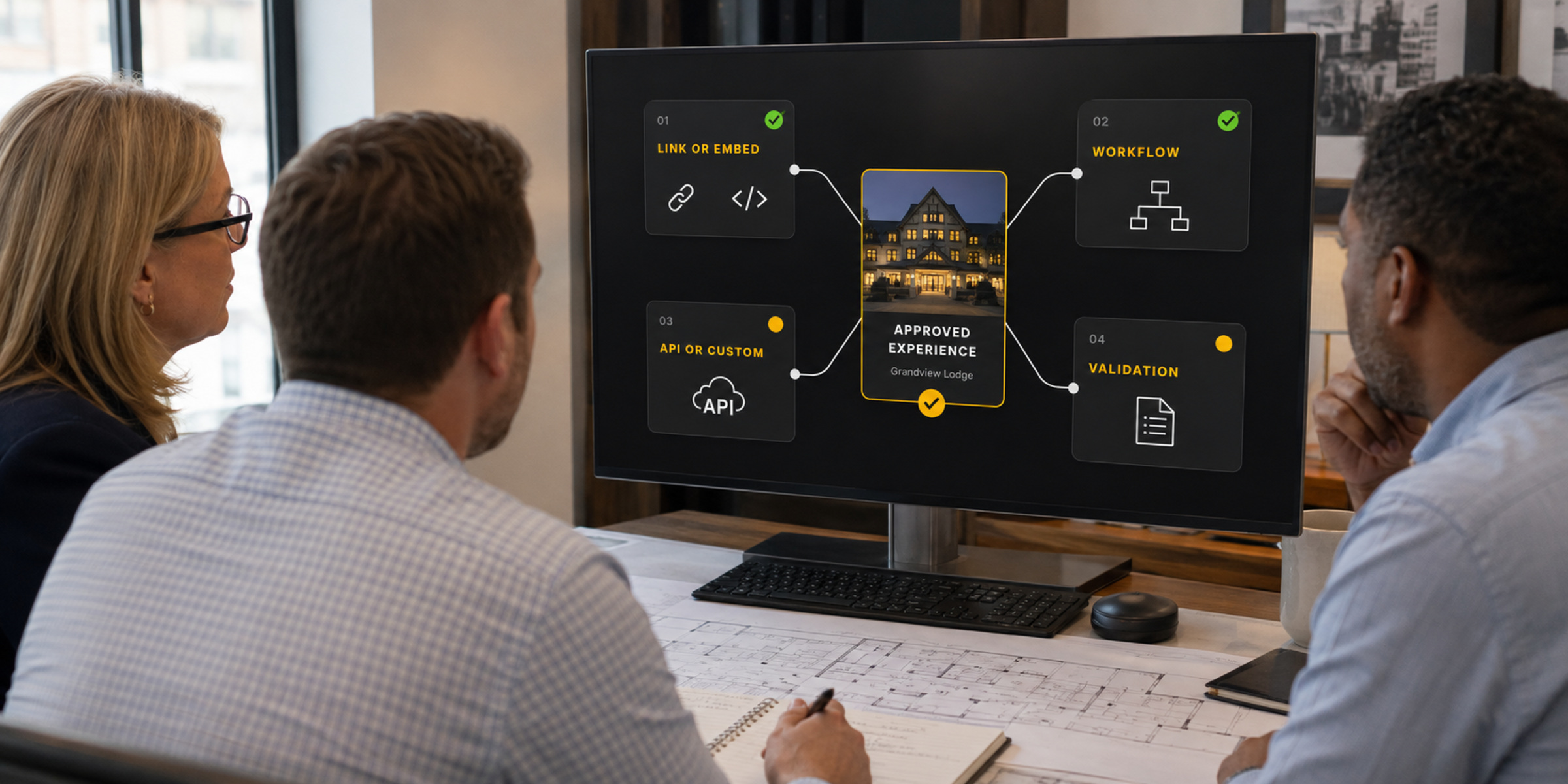
Distribution ArchitectureOne Approved Property Experience
 SiteSeeProperty experienceApproved source
Standard placementWorkflow useCustom scopeValidation required
Clear Before Connected
Know whether you are sharing a link, placing an embed or connecting data before you call it an integration.
Sometimes the best connection is a direct link. Sometimes the experience belongs inside a page, proposal or RFP workflow. Sometimes a brand or external platform must approve the placement. And sometimes the customer needs a deeper technical connection.
SiteSee identifies the correct method before implementation. That gives your team a clear expectation for ownership, effort, approval, security, measurement and ongoing support.
Start With the Customer Workflow
Strengthen the channels your team and buyers already use.
SiteSee does not ask every organization to adopt the same distribution model. We begin with the places where buyers already discover, evaluate, share and discuss the property, then build the right entry point for each one.
01
Property Discovery
Websites and brand environments
Let buyers move from a property, meetings, accommodations or amenities page into a relevant SiteSee experience while preserving the property’s brand and next action.
02
Qualification and Planning
RFP, proposal and event workflows
Place spatial context beside the commercial information buyers are already reviewing so room names, diagrams, capacities and descriptions do not have to carry the decision alone.
03
Human Follow-Up
Email, signatures and sales communication
Give buyers a direct route back into the property after the conversation ends, with a pathway shaped around the market, account, event type or opportunity being discussed.
04
Broader Reach
Listings, discovery and social channels
Extend the property experience into approved discovery environments where a prospective buyer may first encounter the space, then connect that attention to a clearer next step.
One Source, Different Entry Points
The experience should match why the buyer opened it.
A website visitor, wedding buyer, corporate planner, ownership representative and internal operator do not need the same opening view or the same next action. SiteSee can use the same approved property foundation while presenting a more relevant pathway for the channel and audience.
One property sourceChannel-specific pathwayAudience-relevant contentMeasurable next action
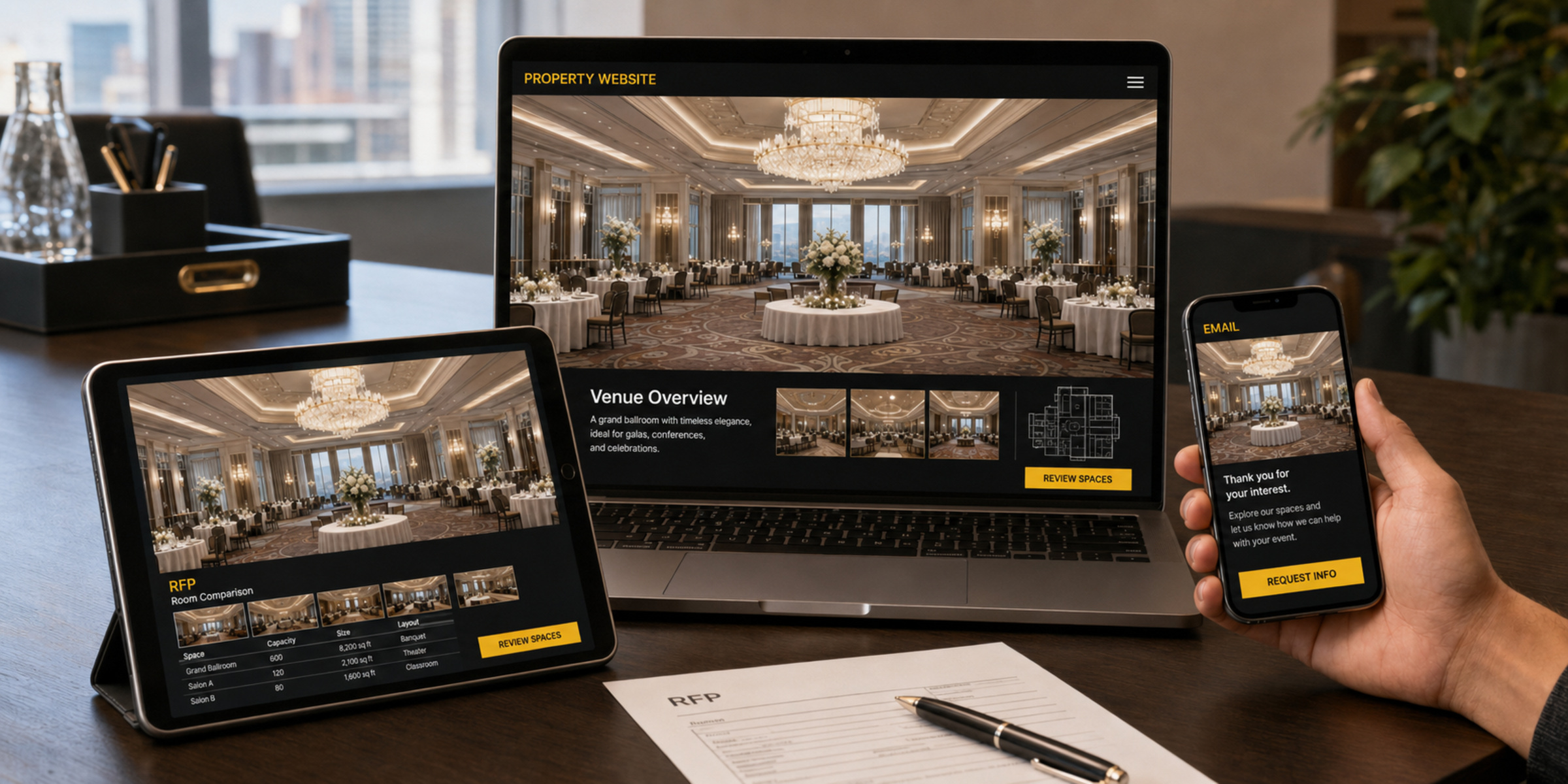
Channel EntryBuyer Decision PathMeasured Outcome
Customer resultThe connection preserves context from first click to next action.
Integration and Distribution Directory
Designed for the environments property and flexible-space teams already use.
The examples below identify common placement, workflow and validation environments. They do not imply a partnership, certification or native data exchange. Availability and method are confirmed for each customer, property, brand, region and platform.
01
Brand and Property Environments
Place the experience where buyers research the property.
Hilton EventsHyatt CANVASIHG Brand WebsitesHoliday InnHotel IndigoMarriott COREMarriott NarrativePullmanRadissonSofitelSonestaViceroySynXisBrand Portal / CMSSquarespaceProperty Websites
Typical pathLink, popup, approved embed or brand-managed placement
02
Event, RFP and Proposal Workflows
Bring the property into the commercial document or planning process.
CventCvent Event DiagrammingEventectiveProposalPathQ9 DigitalSendSitesSpeedRFPTripleseatWeddingWireTeneoSales ProposalsRFP Responses
Typical pathWorkflow-compatible link, button, attachment reference or scoped connection
03
Search, Listings and Discovery
Give early-stage interest a clearer route into the property.
AgodaBooking.comGoogle Business ProfileGoogle Street ViewFacebookLinkedInCampaign Landing PagesApproved Listing Sites
Typical pathValidated external link, profile placement, campaign entry or approved content handoff
04
Direct and Enterprise Distribution
Support the buyer conversation and the organization behind it.
EmailEmail SignaturesDirect Buyer LinksQR CodesSales PresentationsCRM WorkflowsClient PortalsInternal SystemsPortfolio HubsAuthenticated Environments
Typical pathTrackable link, controlled access, embed, API or custom enterprise scope
Not seeing your system? The directory is not a limit. It is a starting point for determining whether the right method is standard placement, workflow compatibility, brand validation or custom technical scope.
Implementation
Add the experience without creating another disconnected workflow for your team to manage.
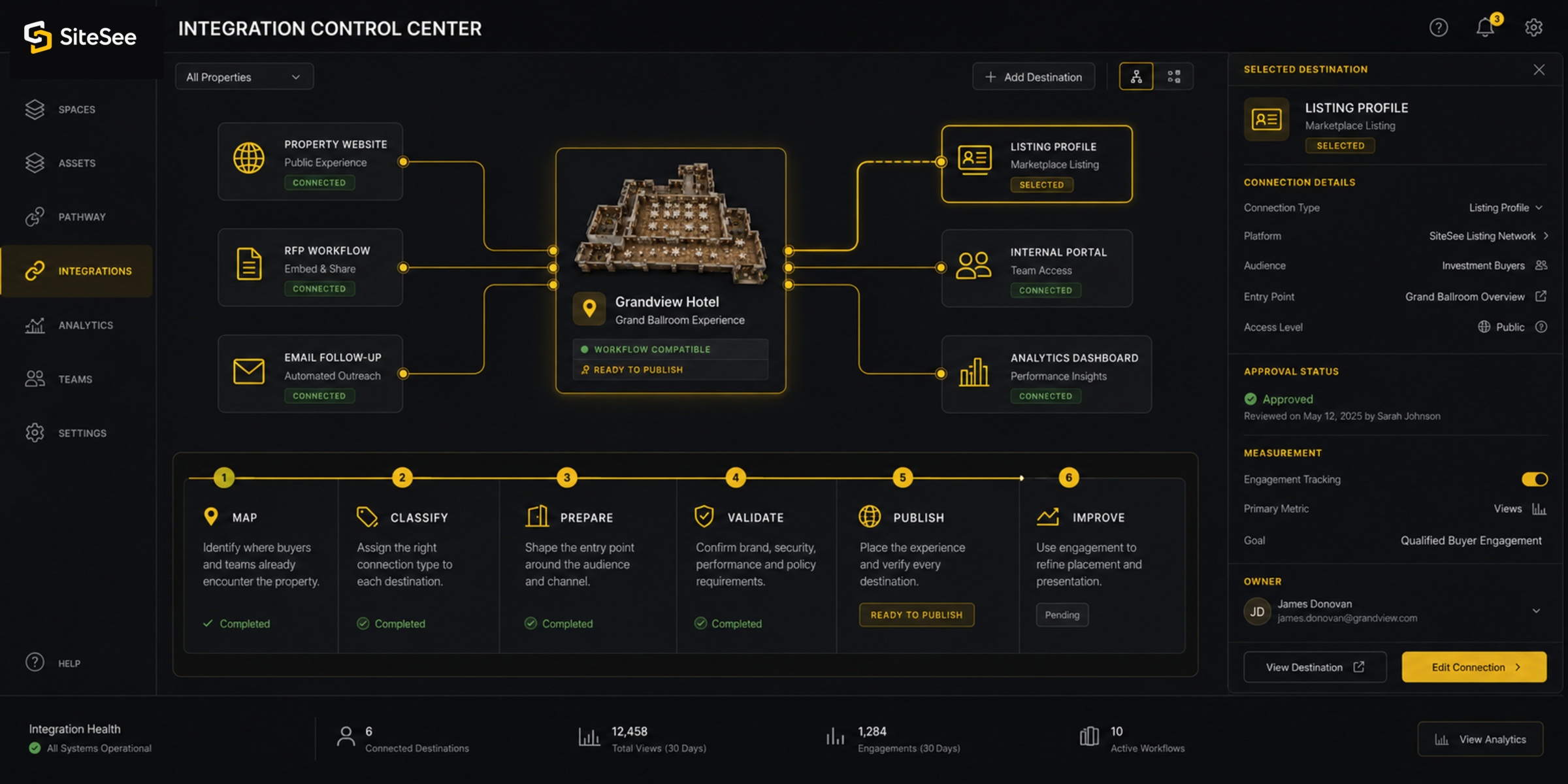
Identify where buyers and teams already encounter the property.
We document websites, proposals, RFP systems, email, brand requirements, listings and internal workflows.
Assign the right connection type to each destination.
Every placement is labeled as link or embed ready, workflow compatible, custom scope or validation required.
Shape the entry point around the audience and channel.
We select the opening space, pathway, content, access level, call to action and measurement structure.
Confirm brand, security, performance and policy requirements.
The customer and relevant system owners approve the implementation before public or internal release.
Place the experience and verify every destination.
Links, embeds, buttons, QR codes and custom connections are tested in the real operating environment.
Use engagement to refine placement and presentation.
Channel naming and analytics help the team see what deserves greater prominence, revision or expansion.
Distribution Intelligence
More placements matter only when the team can learn from them.
SiteSee can organize channel names, experience variants, campaign parameters and calls to action so the property can compare how different entry points are used. The measurement model is established during implementation and follows the customer’s privacy, access and reporting requirements.
Channel-level engagementExperience and pathway useContent and space attentionCalls to action and next steps
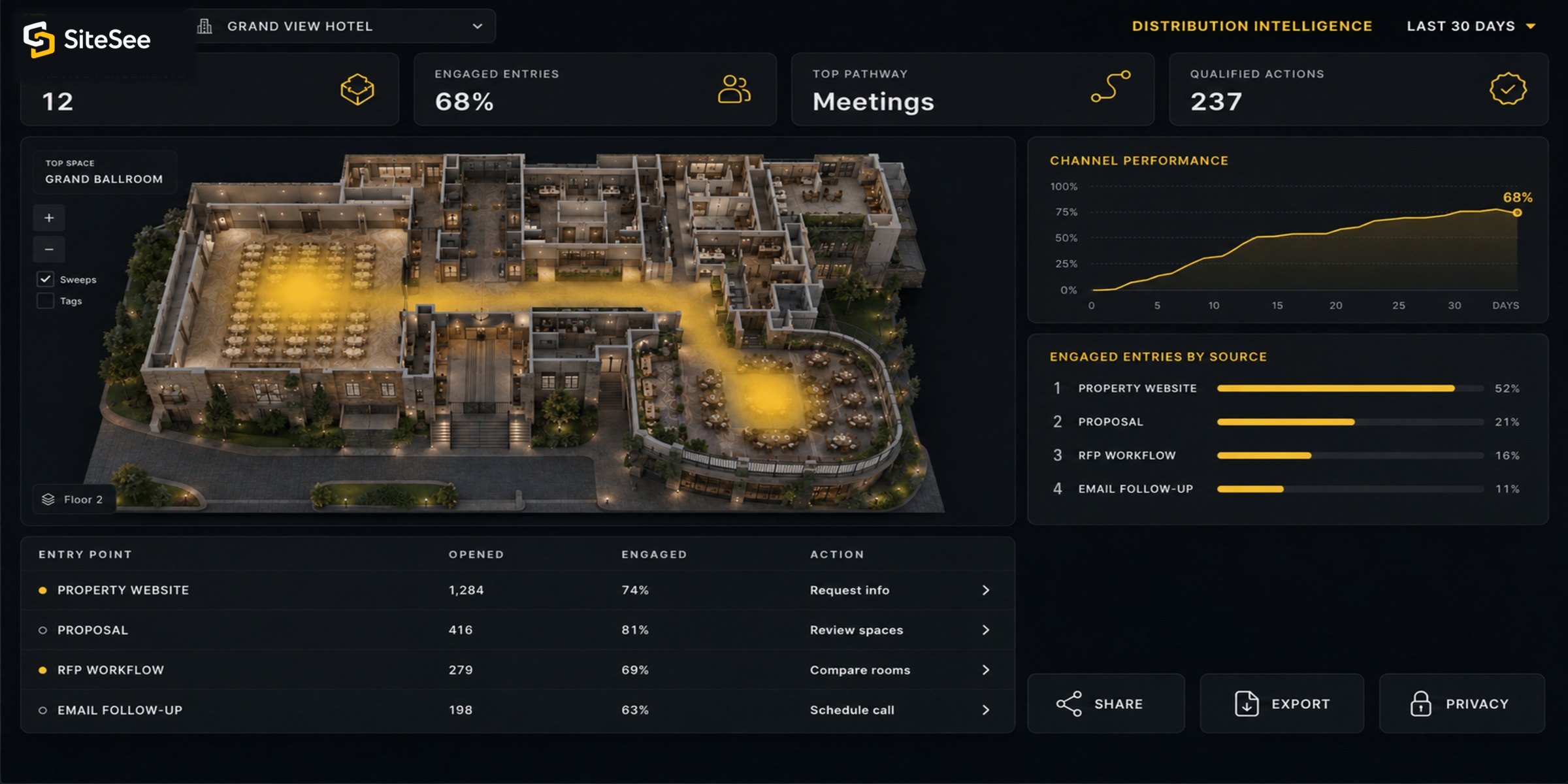
Illustrative Channel ViewLast 30 Days
Entry pointOpenedEngagedAction
Property website1,28474%Request info
Proposal41681%Review spaces
RFP workflow27969%Compare rooms
Email follow-up19863%Schedule call
Illustrative interface onlyFinal metrics depend on configured analytics, access and privacy requirements.
Beyond the Directory
Your technology environment does not need to look like everyone else’s.
Properties, brands, management companies, universities, senior-living communities, cultural organizations and venue groups often use a combination of public websites, approved vendor platforms, internal portals and locally developed systems.
SiteSee can evaluate the operating environment and define the responsible connection. When a system requires authoritative data, authentication, security review or custom development, those requirements are scoped before the capability is represented as available.
Discuss a system not shown here →SiteSee Integrations & Distribution
Extend the reach of your property experience while preserving one approved source.
Show us where buyers and teams currently encounter your property. We will identify which connections can use a standard placement, which require workflow or brand validation, and which deserve custom technical scope.