
AI-Assisted Design & Guided Experiences // The Property and Flexible-Space Sales Operating System
If buyers cannot see the future condition, they cannot evaluate it with confidence.
SiteSee combines approved 2D and 360-degree staging, virtual configurations, CGI visualization and guided buyer pathways inside the property experience. Sales, marketing, events and development teams can show current conditions, proposed uses and future spaces without asking the buyer to imagine the missing pieces.
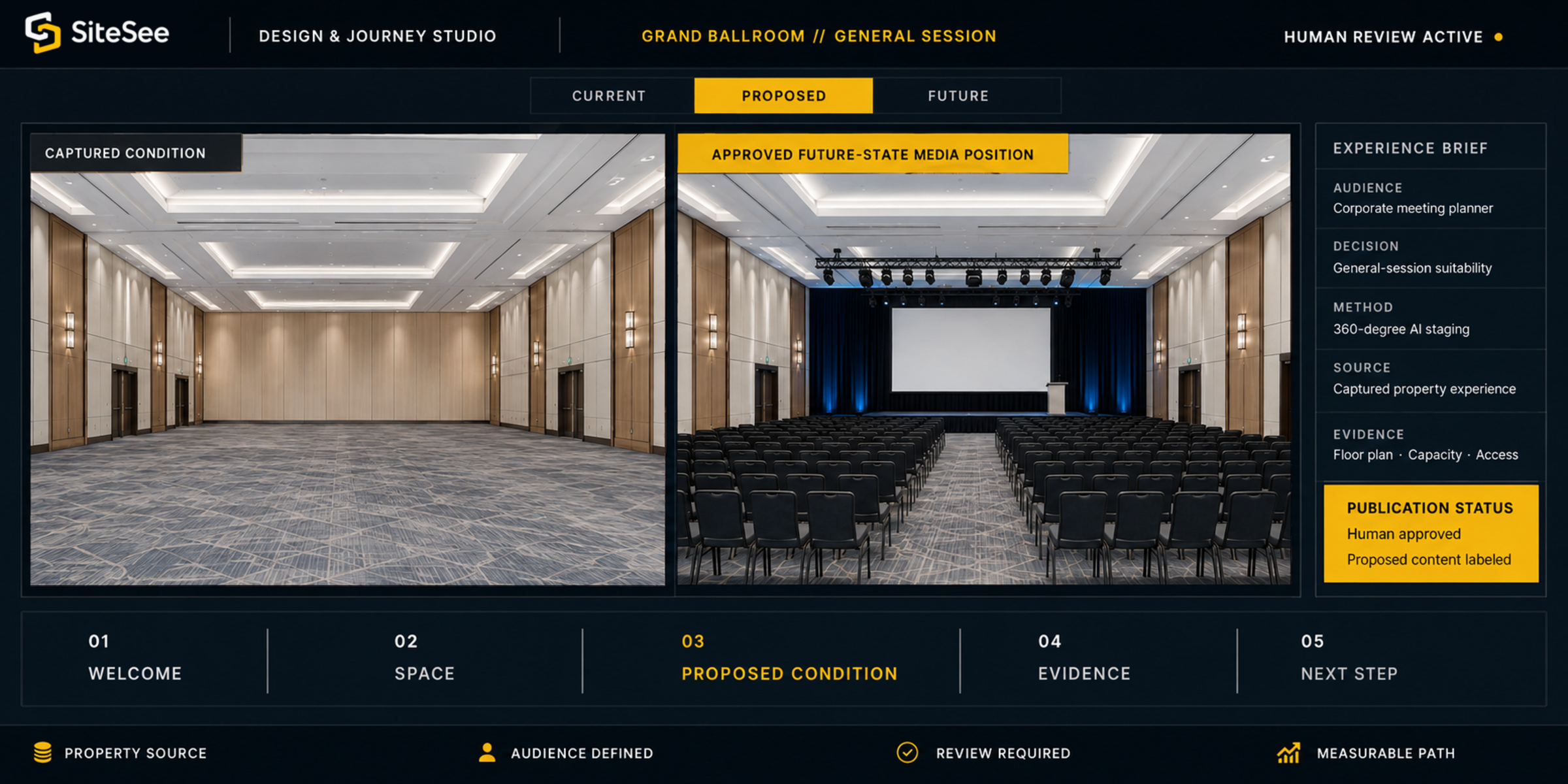
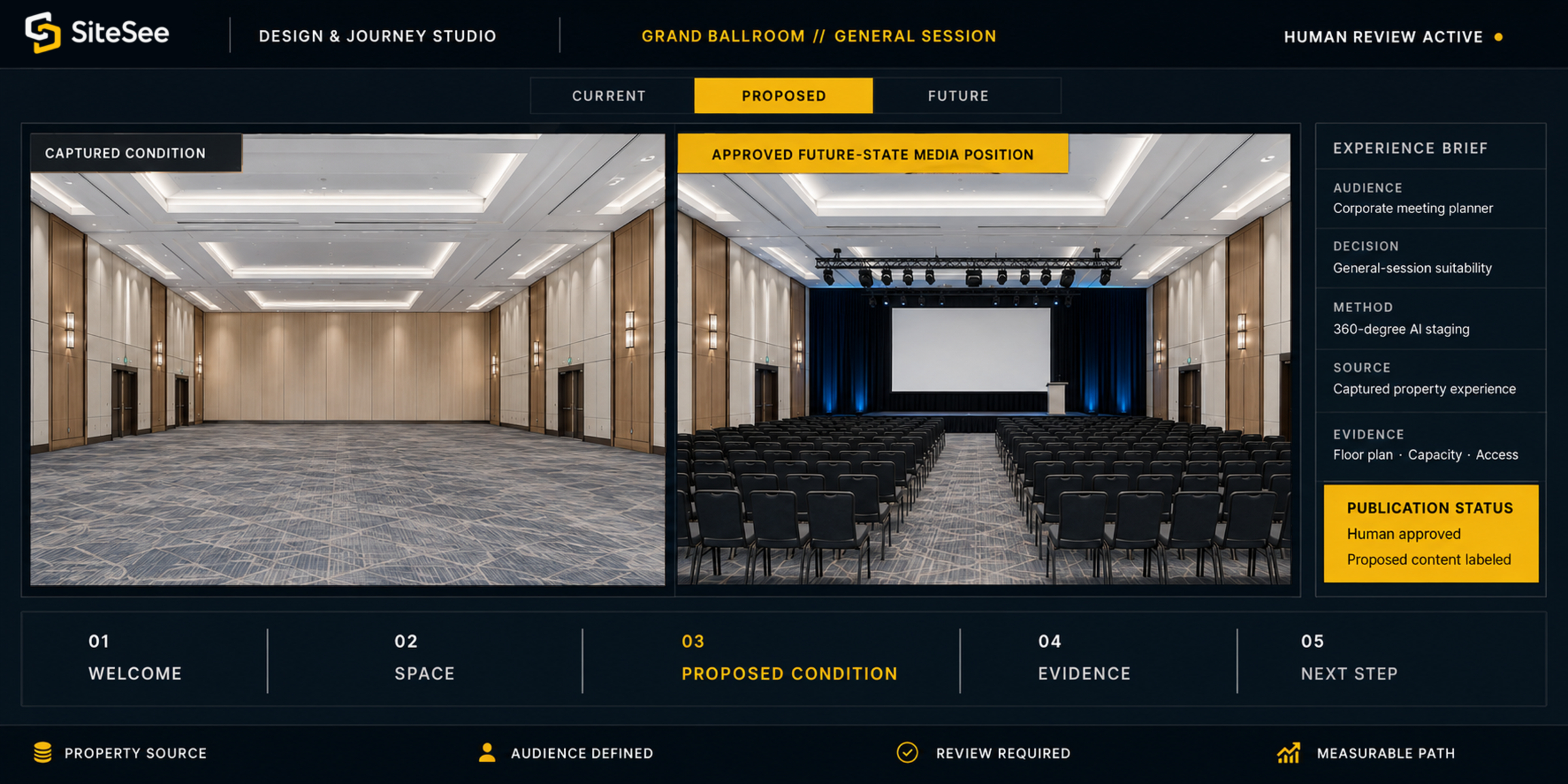 Captured condition
The Visualization Gap
A proposed condition becomes easier to evaluate when buyers can see it in the real property context.
A ballroom captured between events may look empty. A restaurant may not be set for a private buyout. A renovation may be months from completion. A pre-opening property may exist only in approved plans. When the intended condition is missing, buyers are forced to translate words, drawings and references into a picture of their own.
Design Methods
Use the simplest visual method that gives the buyer a credible answer.
Not every opportunity needs the same production method. A proposal may need one staged image. A room-wide event concept may need a 360-degree condition. A pre-opening property may require CGI built from approved plans. SiteSee scopes the method around what the buyer must understand.
Approved furnishings, décor, setup or design direction in a still image connected to the property.
Add-onA proposed condition that can be reviewed in every direction instead of from one selected angle.
Add-onFurniture, stages, exhibits, equipment, sponsor elements or human-scale references inside the scene.
Plan / Add-onA navigable pre-opening, renovation, proposed expansion or future property condition.
Enterprise / CustomAn approved visual explanation of arrival, event changeover, development or a future-state narrative.
Production ScopeFrom Source to Approved Alternative
Faster creation still requires clear sources, approvals and representation.
Every proposed condition begins with an approved source and ends with a reviewed, clearly labeled asset. AI may accelerate concept development, but the property remains responsible for what the buyer sees.
Begin with the actual property, approved plans or an authorized template.
Confirm source rights, property facts and the condition being represented.
Name what the buyer needs to evaluate before producing anything.
Set audience, use, configuration, style, brand and practical boundaries.
Use the appropriate AI, staging, CGI, object or media-production method.
Generate only the concepts required to support the approved decision.
Compare the output with the brief, property and supporting information.
Correct misleading details, remove unsupported assumptions and confirm relevance.
Identify every synthetic, proposed or future-state condition clearly.
Record the final human approval before external publication.
Place the alternative inside the relevant property and buyer pathway.
Observe engagement, refine the experience and retire outdated concepts.
Guided Experiences
Put the right evidence in the right order for this buyer.
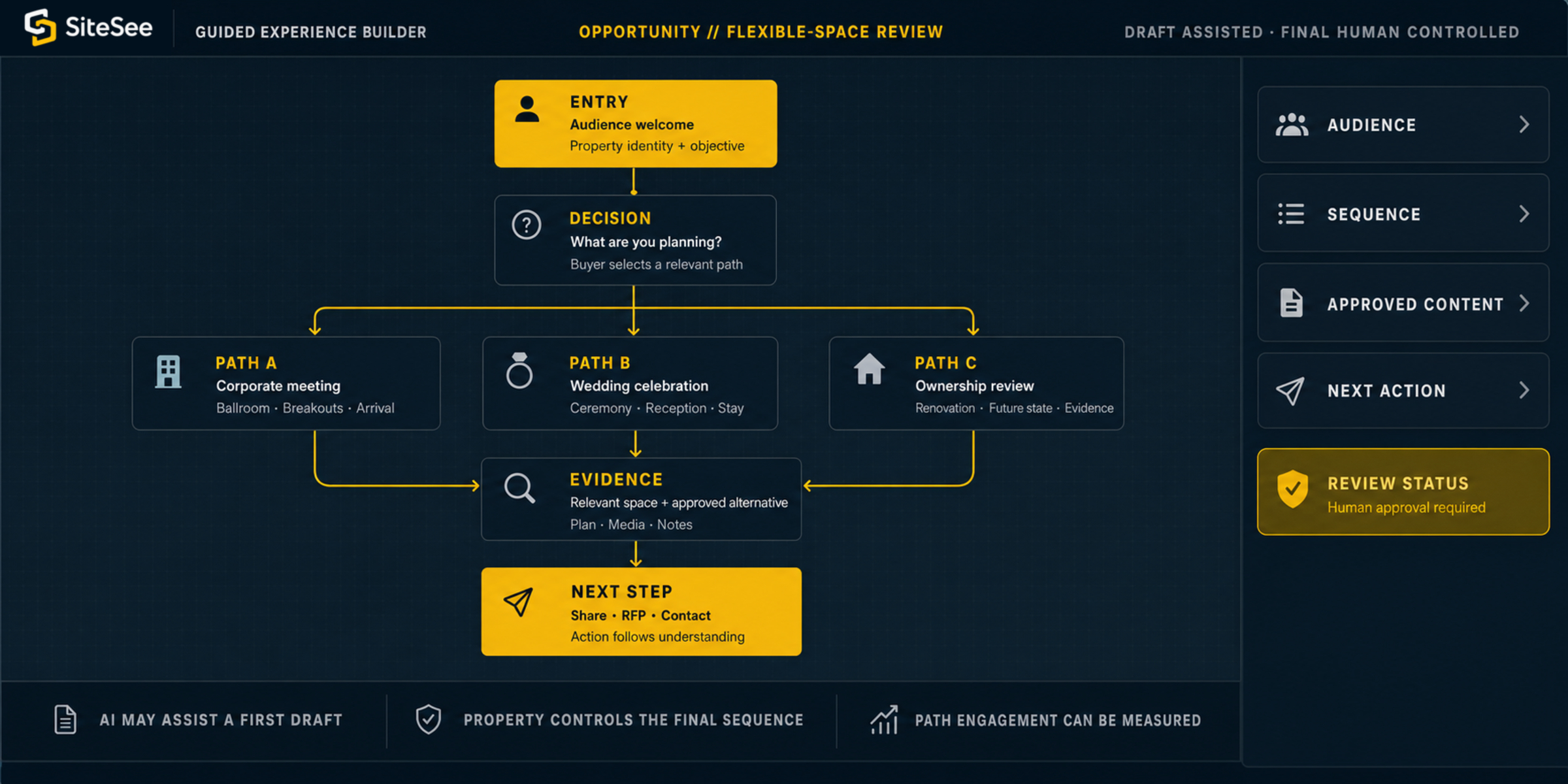
A meeting planner, wedding buyer, ownership group and university stakeholder may all need to understand the same property differently. SiteSee lets the property prepare a relevant entry, recommended sequence, decision points and next actions without forcing every visitor through one generic presentation.
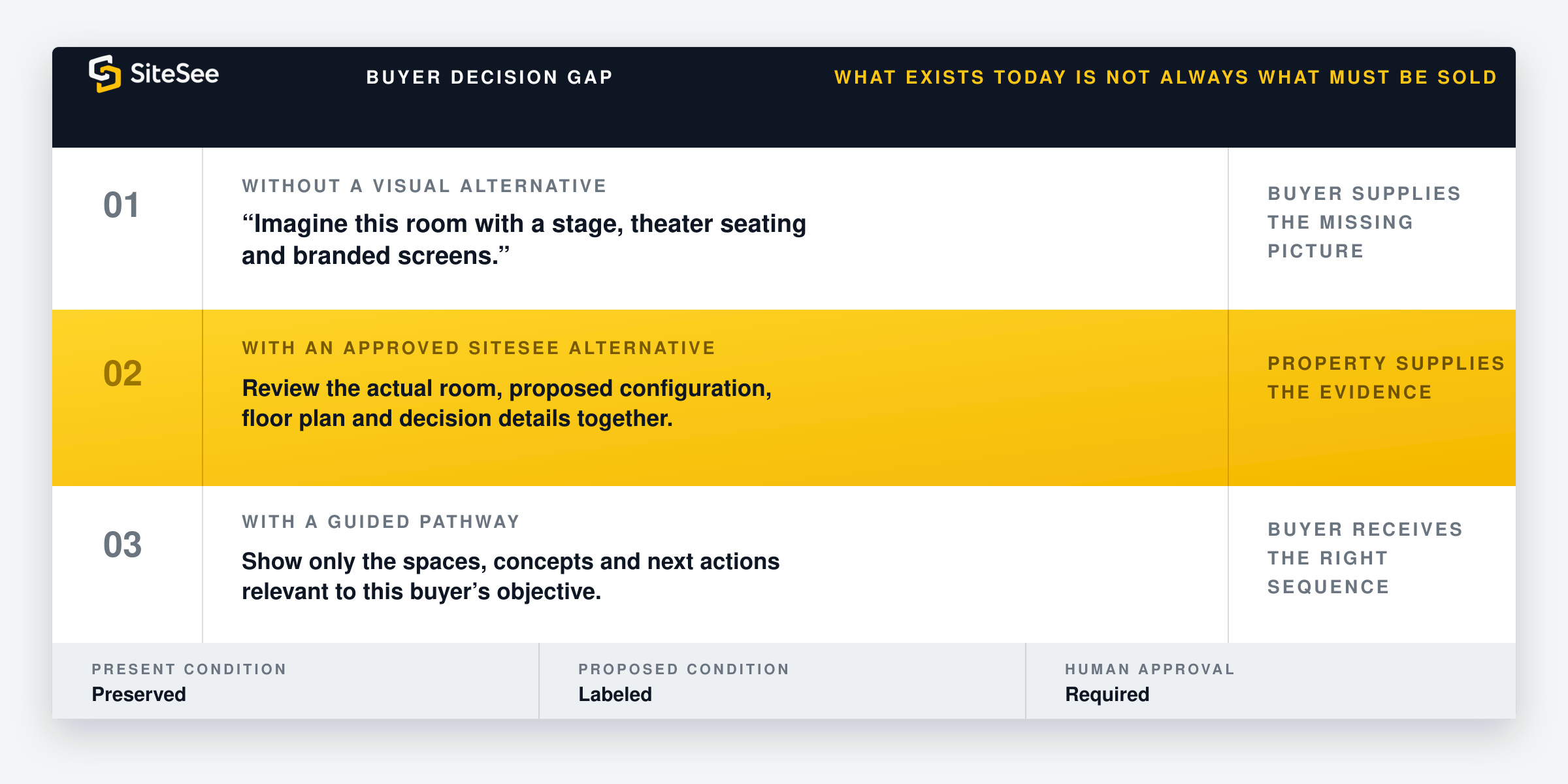
One Property. Different Decisions.
Connect the visual alternative to the buyer’s actual question.
The value does not come from creating more imagery. It comes from showing the right condition, in the right property context, for the decision this audience must make.
The room is not set for the event being sold.
The future property must be sold before completion.
The same property serves several different buying situations.
Team-Side Assistance
Help the property team create and organize faster.
AI-assisted tools may help generate first-draft visual concepts, organize approved alternatives and support the initial structure of a guided pathway. The team still defines the objective, approves the source, reviews the output and controls publication.
- Design settings and controlled creative direction
- 2D and 360-degree concept generation
- Approved design library and concept comparison
- AI-assisted first-draft guided flow
Buyer-Side Assistance
Help the visitor find approved information within clear boundaries.
An AI-assisted conversational layer may be considered when the property has a validated knowledge source, privacy plan, escalation path and demonstrated account capability. It should help the buyer locate approved information, not invent property facts or replace the sales relationship.
- Bounded property knowledge
- Approved responses and content sources
- Privacy and consent review
- Human escalation and accountable follow-up
Representation Trust
Proposed is never presented as present.
Future-state visualization is useful only when the buyer understands exactly what is real, what is proposed, what source supports it and who approved it.
Identify synthetic, staged, proposed and future-state media clearly.
Do not allow a buyer to mistake an alternative concept for the current physical property.
Build from authorized property media, plans, templates and customer direction.
Rights, facts, measurements and brand requirements remain under customer control.
Inspect every visual and pathway before external publication.
Remove unsupported details, correct misleading output and document the approved version.
Separate commercial visualization from engineering, architectural or life-safety approval.
Preliminary concepts support understanding. Authoritative decisions still require the appropriate professionals and systems.
Availability & Implementation
Start with the capability the decision actually requires.
Guided selling can begin with core platform functions. AI-assisted design and future-state visualization are added only when they create enough value to justify production, review and governance.
Direct attention with approved structure.
- Audience-specific welcome
- Property navigation and highlight reel
- Exact-location links
- Contextual contact and RFP actions
Show an approved alternative inside the property.
- 2D and 360-degree AI staging
- In-experience restaging
- Virtual staging and design library
- Design settings, credits and revisions
Sell the future before physical completion.
- CGI experience from plans
- Pre-opening and renovation visualization
- Proposed expansion visualization
- AI-assisted preconstruction selling
Activate only after behavior and controls are validated.
- AI-assisted guided-flow creation
- Buyer-facing AI conversational layer
- Validated knowledge source
- Privacy, permissions and escalation
Begin With the Condition the Buyer Cannot Yet See
Help buyers examine the possible condition together—without confusing proposed with present.
Define the current condition, proposed use, future property or audience pathway that is difficult to explain today. SiteSee can then determine the least complex visual and guided approach needed to support the decision.