
Portfolio Management & Governance // The Property and Flexible-Space Sales Operating System
Scale a stronger property experience without flattening what makes each property different.
SiteSee gives management companies, brands, ownership groups and multi-property operators one governed way to organize teams, apply standards, control access, publish approved experiences and compare engagement—while each property keeps the spaces, story and buyer pathways that make it commercially distinct.
Common standardsLocal relevanceControlled accessPortfolio visibility
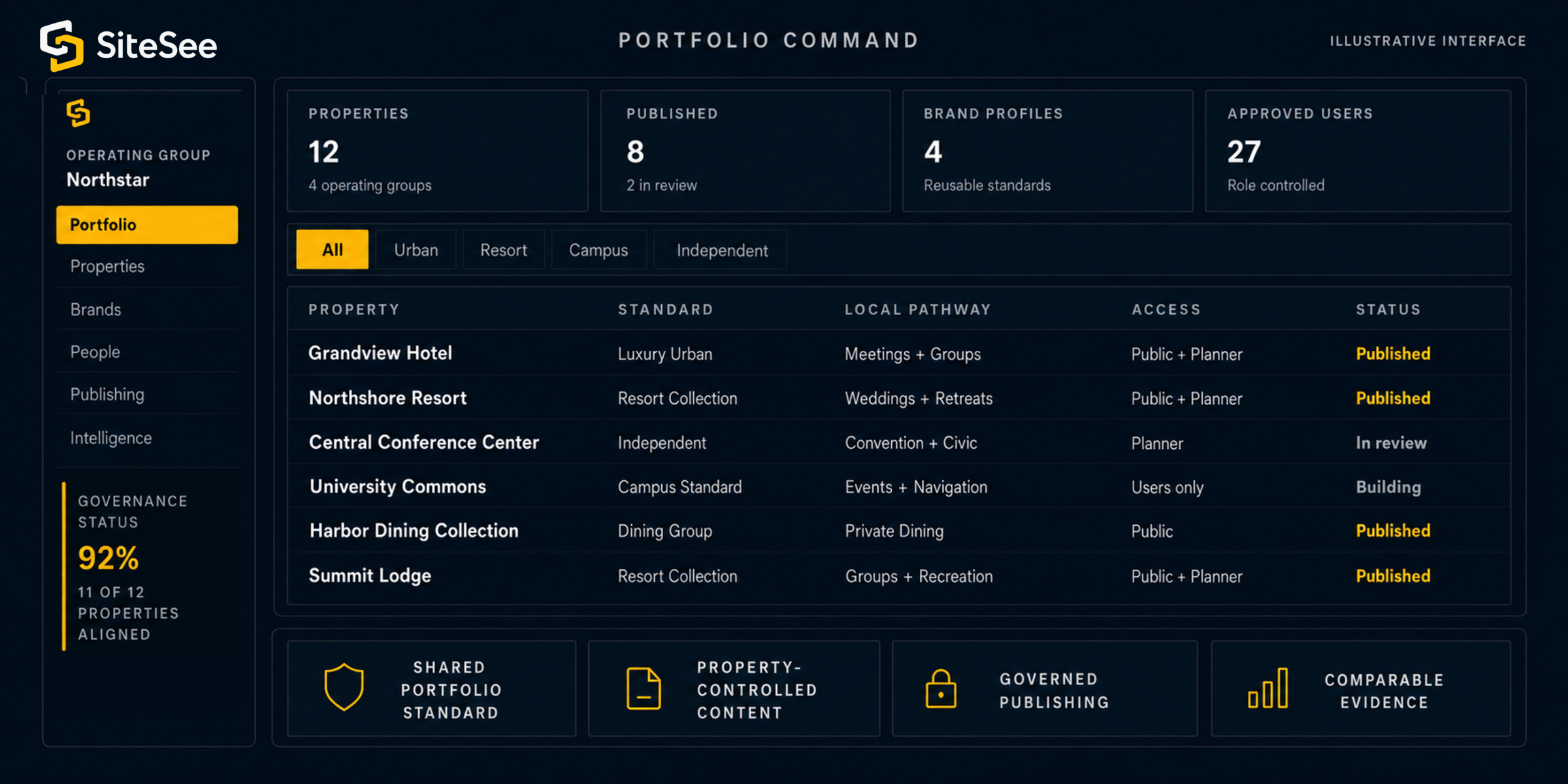
Portfolio CommandNorthstar Property GroupIllustrative interface
PropertyStandardLocal pathwayAccessStatus
Grandview HotelChicago · Urban
Luxury UrbanMeetings + GroupsPublic / PlannerPublishedNorthshore ResortLakefront · Resort
Resort CollectionWeddings + RetreatsPublic / PlannerPublishedCentral Conference CenterMetro · Independent
IndependentConvention + CivicPlannerIn reviewUniversity CommonsCampus · Education
Campus StandardEvents + NavigationUsers onlyBuildingHarbor Dining CollectionWaterfront · Urban
Dining GroupPrivate DiningPublicPublishedSummit LodgeMountain · Resort
Resort CollectionGroups + RecreationPublic / PlannerPublishedShared portfolio standardProperty-controlled contentGoverned publishingComparable evidence
The Scale Problem
Your portfolio needs repeatable controls and enough local freedom to keep every property credible.
When every property starts from zero, the portfolio inherits duplicated work, inconsistent access and fragmented reporting. When every decision waits for a central team, local knowledge becomes a bottleneck and every property begins to sound alike.
SiteSee separates what should be governed from what should remain property-specific.
01
Every property starts overLocal independence without a shared operating standard.
- Repeated setup and production decisions
- Different naming, access and publishing rules
- Reporting that cannot be compared cleanly
- Knowledge trapped at the property level
02
SiteSee governed networkCommon controls with delegated property ownership.
- Reusable brand and experience standards
- Defined roles, permissions and approval paths
- Local spaces, stories and buyer pathways
- Portfolio evidence with property context intact
03
Everything is centralizedConsistency gained through delay and sameness.
- Central bottlenecks for routine changes
- Local expertise used too late
- Generic presentation across different properties
- Standards confused with identical execution
Customer resultLeadership controls the system. Property teams control the approved local truth. Buyers receive an experience that is both consistent and relevant.
One Portfolio. Different Responsibilities.
Give each level of the organization the view and authority needed to do its work.
A portfolio does not have one user. Leadership, brand, property and operational teams ask different questions. SiteSee can preserve one governed foundation while changing what each role sees, controls and measures.
Leadership Portfolio View
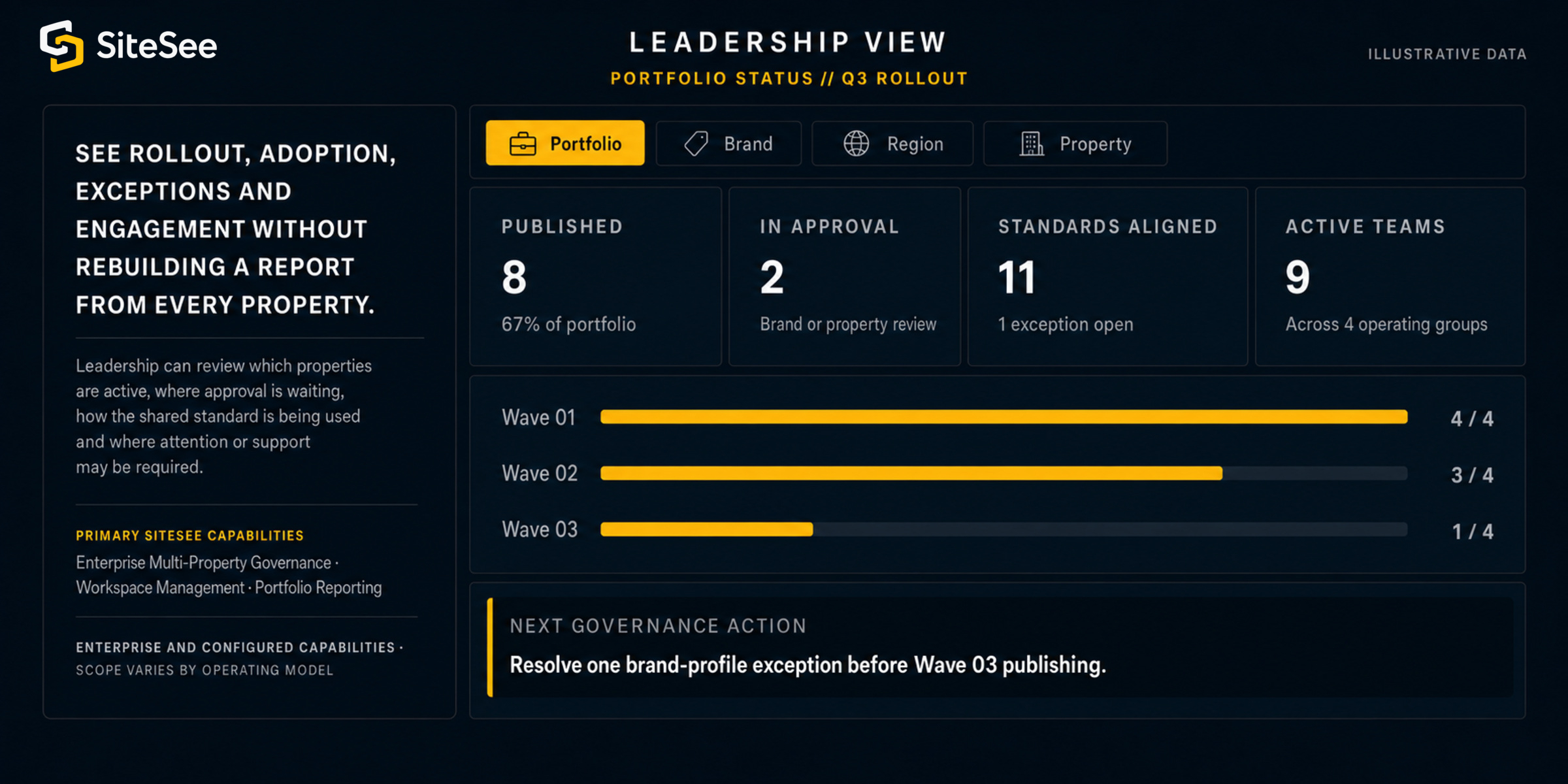
See rollout, adoption, exceptions and engagement without rebuilding a report from every property.
Leadership can review which properties are active, where approval is waiting, how the shared standard is being used and where attention or support may be required.
Primary SiteSee capabilitiesEnterprise Multi-Property Governance · Workspace Management · Portfolio ReportingEnterprise and configured capabilities · scope varies by operating model
Leadership ViewPortfolio status // Q3 rollout
Next governance actionResolve one brand-profile exception before Wave 03 publishing.
Brand & Marketing ViewApproved identity system
Proposed→Property review→Brand approved→Publish
Brand principleStandardize the identity system—not the property story.
Property Team ViewGrandview Hotel // Local control
Local responsibilityKeep facts, media, availability-sensitive content and buyer relevance current.
IT & Operations ViewAccess and system controls
Control principleMatch access to responsibility, information sensitivity and the approved system of record.
Standards Without Sameness
Standardize what should repeat. Protect what should remain specific.
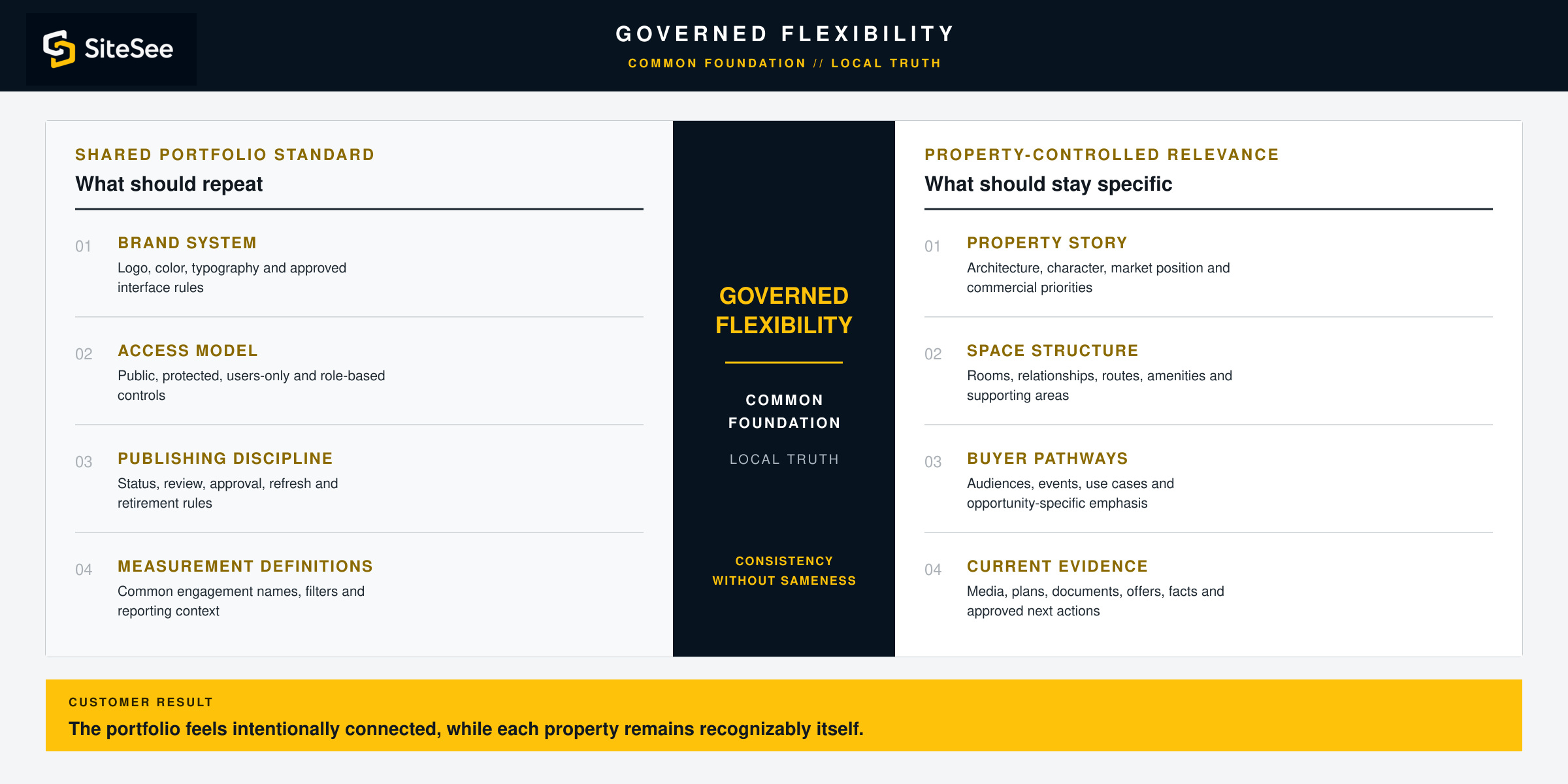
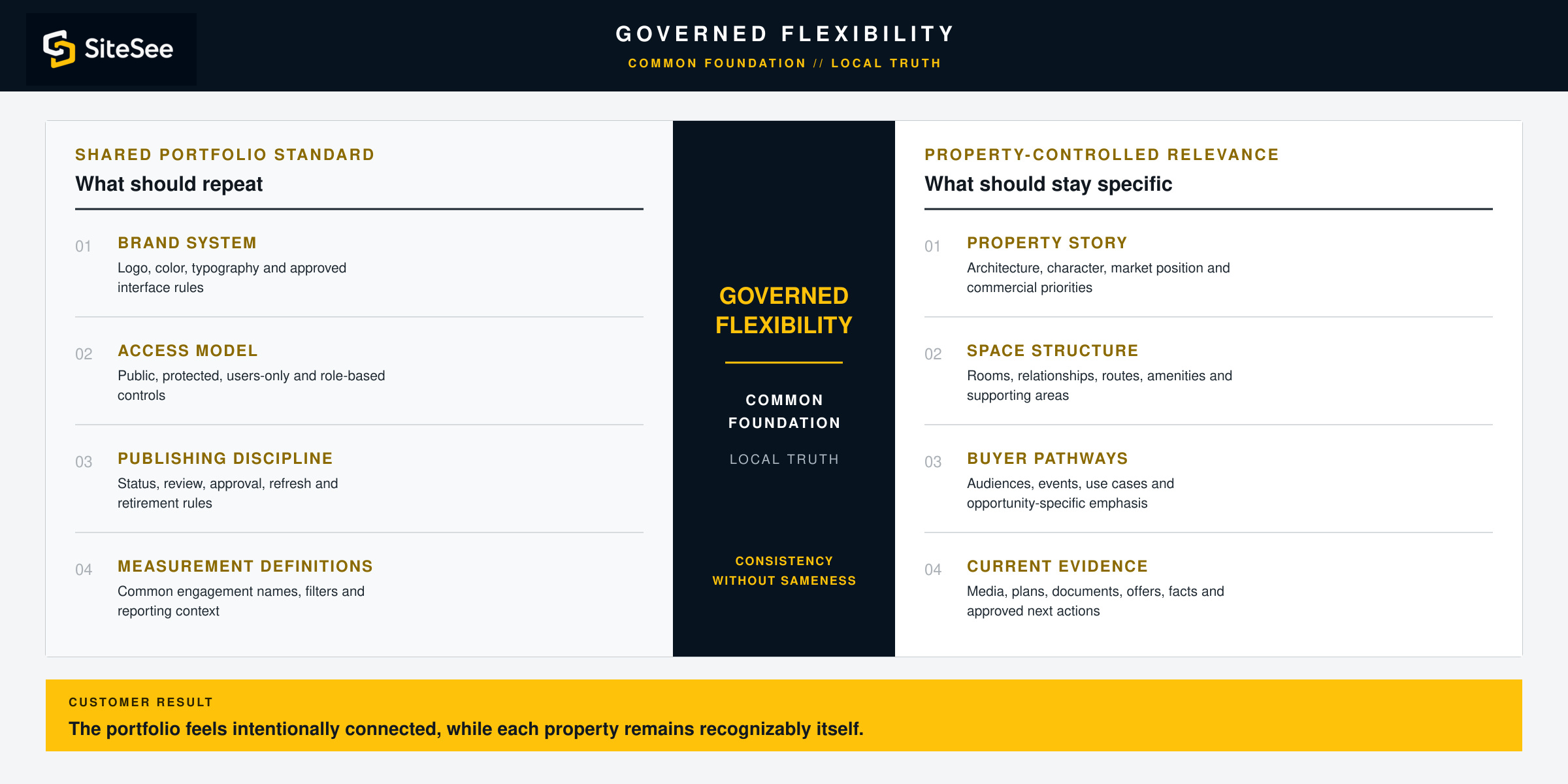
Consistency is valuable when it reduces preventable variation. It becomes harmful when it removes the property character, local knowledge or buyer relevance that makes a space worth choosing.
Customer resultThe portfolio feels intentionally connected, while each property remains recognizably itself.
Shared portfolio standardWhat should repeat
Brand systemLogo, color, typography and approved interface rules
Access modelPublic, protected, users-only and role-based controls
Publishing disciplineStatus, review, approval, refresh and retirement rules
Measurement definitionsCommon engagement names, filters and reporting context
 Governed flexibilityCommon foundationLocal truth
Property-controlled relevanceWhat should stay specific
Property storyArchitecture, character, market position and commercial priorities
Space structureRooms, relationships, routes, amenities and supporting areas
Buyer pathwaysAudiences, events, use cases and opportunity-specific emphasis
Current evidenceMedia, plans, documents, offers, facts and approved next actions
People, Roles & Permissions
Give each person the authority needed to do the work—and no more than the role requires.
A portfolio can include central administrators, brand teams, property editors, reviewers, agencies and outside stakeholders. SiteSee organizes ownership through workspaces, projects, invitations, standard roles and custom permissions where the operating policy requires greater precision.
RolePortfolio structureBrand standardsProperty contentReview & approvalReportingAccess level
Portfolio administrator●●As assigned●●Standard or custom role
Brand / marketing managerView●Review●Brand scopeStandard role
Property editorPropertyApply●SubmitProperty scopeStandard role
Reviewer / approver—ReviewComment●As assignedStandard or custom role
External stakeholder——Approved viewReview only—Controlled access
Separate approved organizations, teams or operating environments.
CoreGroup related property, campaign and production work.
CoreBring people into the right workspace with recurring permission levels.
CoreApply more granular enterprise controls when policy requires them.
Enterprise / customGoverned Publishing & Distribution
Use one approved source across different audiences, access levels and brand environments.
A public buyer experience, protected planner workspace, authenticated operational view and white-label enterprise presentation should not be treated as the same publishing decision. SiteSee supports distinct access and identity models from one governed property foundation.
Publishing principleThe audience determines the control. The property determines the approved truth.
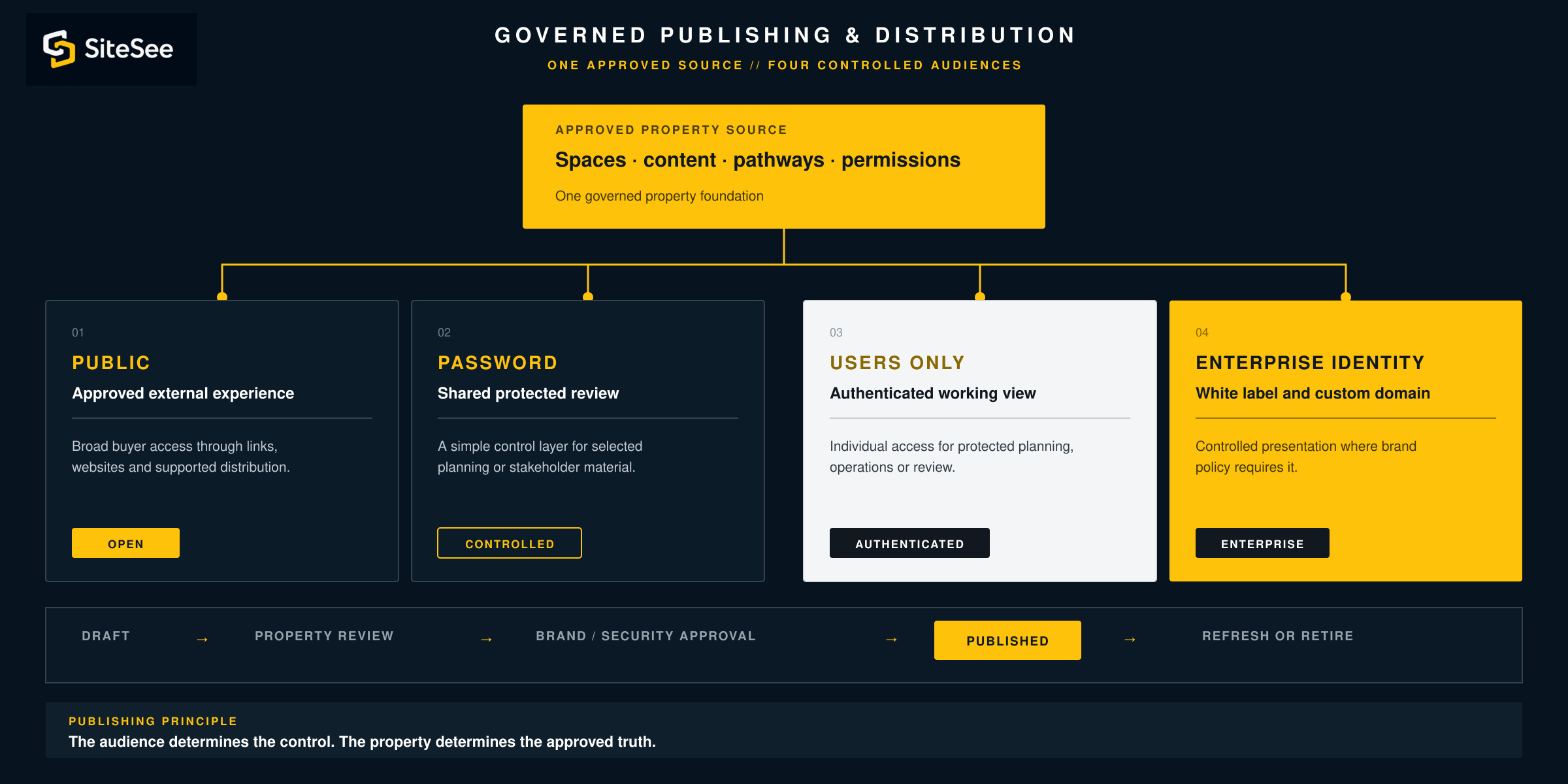
 Approved property sourceSpaces · content · pathways · permissions
Approved external experience
Broad buyer access through links, websites and supported distribution.
CoreShared protected review
A simple control layer for selected planning or stakeholder material.
CoreAuthenticated working view
Individual access for protected planning, operations or enterprise use.
Plan featureWhite label and custom domain
Controlled presentation where brand policy requires SiteSee to remain subordinate.
Enterprise / customDraft→Property review→Brand / security approval→Published→Refresh or retire
From Pilot to Portfolio
Prove the operating standard with one useful deployment, then expand with evidence and control.
A portfolio rollout should not begin by asking every property to build everything at once. The first deployment should prove the standard, expose exceptions and create reusable decisions before the next wave begins.
Set the portfolio purpose and governance standard.
Identify the buyer decisions, shared brand rules, roles, access and reporting requirements that should guide every deployment.
Portfolio leadershipSelect a property that can prove the operating model.
Choose a representative use case with enough complexity to test the standard without creating unnecessary scope.
Leadership + pilot propertyBuild the reusable foundation.
Create workspaces, projects, roles, brand profiles, access levels, publishing rules and reporting definitions.
SiteSee + customer teamValidate the property and the portfolio standard separately.
Confirm local facts and content while central stakeholders review the elements intended to repeat.
Property + brand + governanceLaunch the next wave using proven decisions.
Duplicate approved structures, reuse profiles and adjust only where the new property or operating group genuinely differs.
Controlled rolloutCompare adoption, engagement and exceptions.
Use evidence to refine standards, support teams, update content and decide where the next expansion creates value.
Ongoing governanceIllustrative rollout plan12 properties // 3 controlled waves
Wave 01Pilot propertyComparable urban hotelResort propertyConference venueStandard proven
Wave 02Property 05Property 06Property 07Property 08One exception open
Wave 03Property 09Property 10Property 11Property 12Scheduled
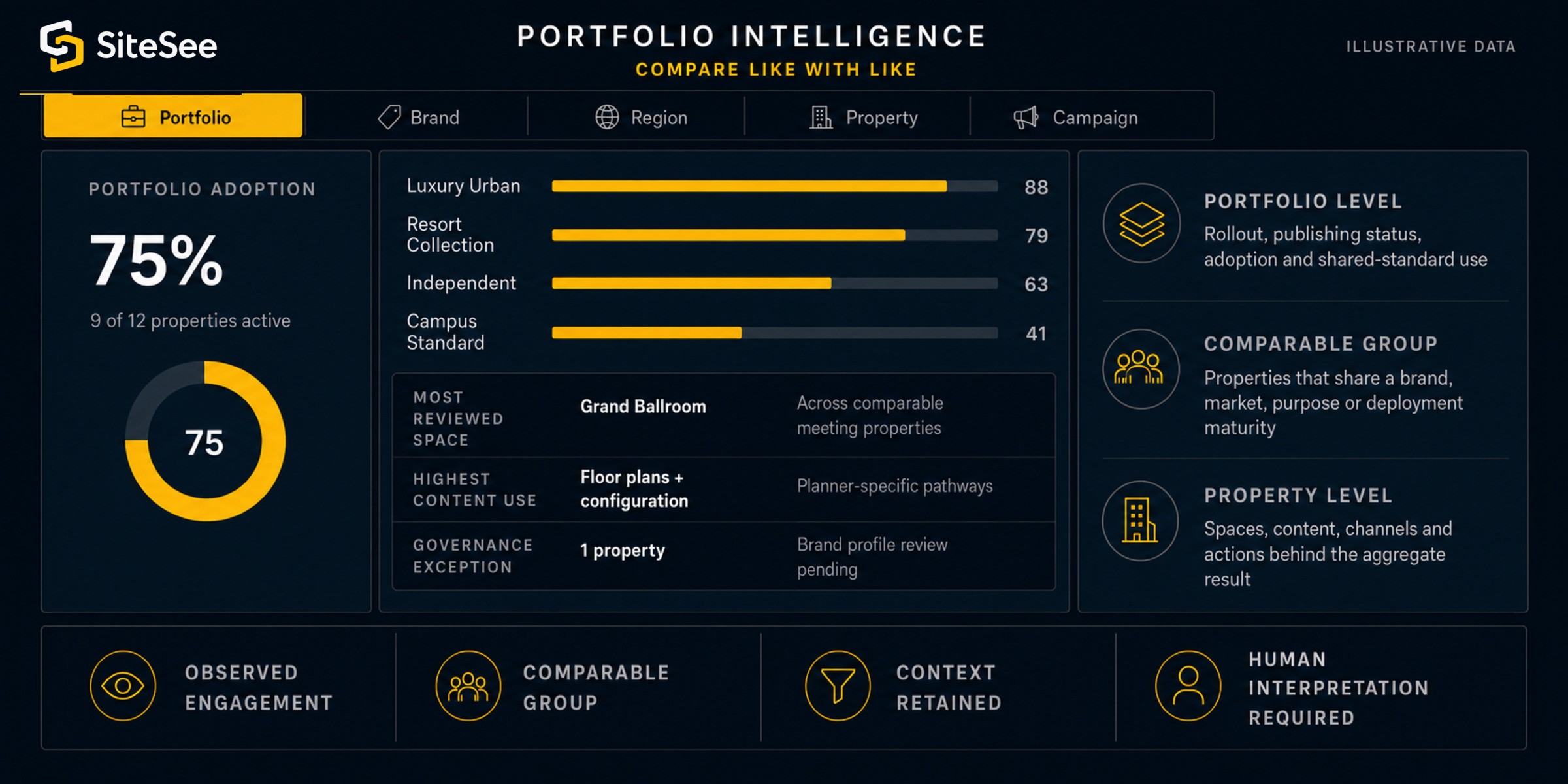
Portfolio IntelligenceCompare like with likeIllustrative data
PortfolioBrandRegionPropertyCampaign
Observed engagementComparable groupContext retainedHuman interpretation required
Portfolio Intelligence
Compare performance without reducing every property to the same score.
Portfolio evidence becomes useful when the comparison is fair and the local context remains visible. SiteSee can organize reporting by property, brand, region, campaign or approved operating group, then connect the result back to the spaces, content and pathways that produced it.
Portfolio levelReview rollout, publishing status, adoption and shared-standard use.
Comparable groupCompare properties that share a brand, market, purpose or deployment maturity.
Property levelReturn to the spaces, content, channels and actions behind the aggregate result.
Analytics support a better question. They do not prove buyer intent, replace CRM or PMS records, or remove the need for commercial judgment.
Explore Analytics & Buyer Intelligence →Capability and Implementation Levels
Begin with the controls needed today. Add enterprise depth only where the operating model requires it.
Portfolio governance is not one universal configuration. The right structure depends on the number of properties, brands, users, access levels, systems, approval requirements and reporting needs involved.
Organize work and publish with basic control.
- Workspace Management
- Project Management
- Experience Duplication
- User Invitations
- Standard User Roles
- Public and Password Access
Support recurring teams, brand systems and authenticated use.
- User Management
- Brand Profiles
- Reusable Brand Profiles
- Users-Only Access
- Configured reporting and review
Apply deeper control across complex organizations.
- Custom Permissions
- White-Label Experience
- Custom Domain
- Enterprise Multi-Property Governance
- API and Custom Integration Scope
Confirm the authoritative source and policy before connection.
- Identity and access requirements
- Privacy and record-retention rules
- Brand and content ownership
- System-of-record responsibilities
- External platform permissions
Governance Boundaries
Use SiteSee to control the property experience—not to blur the authority of the systems and people that govern the business.
SiteSee can coordinate presentation, access, publishing, collaboration and engagement evidence. The customer remains responsible for authoritative data, brand approval, legal and privacy policy, security requirements, content rights and the official systems that govern transactions or operations.
Authority
Keep availability, pricing, contracts and operational records in their approved systems of record.
SiteSee may connect or display governed information where the source and implementation are validated.
Ownership
Confirm who may create, approve, publish, update and retire each experience.
Roles and workflows should reflect actual organizational responsibility rather than convenience alone.
Privacy and security
Match identity, access, retention and protected content to customer policy.
Enterprise requirements are reviewed before deeper access, authentication or system connection is promised.
Local accountability
Keep property facts, media and time-sensitive content current at the level closest to the source.
Central governance improves consistency; it does not remove the property’s responsibility for approved local truth.
Begin With the Standard That Should Repeat
Let every property benefit from a proven system without losing the local story buyers need to understand.
Identify what the portfolio needs to control centrally, what each property must own locally, and where the current handoff creates duplicated work or inconsistent buyer understanding. SiteSee can turn those decisions into one governed operating model.